Balane Mind
Everything you ever thought, in one space.
Balane Mind is a private notes app you move through. What you write does not become a row in a list, it becomes a point in a real three-dimensional space — and the space arranges itself by what you write about. The same collection can be arranged five ways: by topic, by time, by closeness of words, by the connections you drew yourself, and by hand. A note written today may be about “summer 2018” or about a period still ahead; the app remembers both, when you wrote and what the text speaks of. Every edit keeps the version before it, so a guess from 2020 and the contradiction from 2026 stand beside each other rather than on top of each other. While you write, the app suggests topics and says which words the suggestion rests on — closeness of words, not of meaning, and switchable off. There is no language model built in and none connected: the app works out the similarity on the device, from the words themselves. The vault sits encrypted on the Mac, the key in the keychain, and there is no account and no server; if you want, you keep it as one file at a place you choose, iCloud Drive for instance, and a second machine opens that same file. If you would rather look first, open the sample space: invented thoughts that store nothing. For macOS.
A thought is not a row in a list
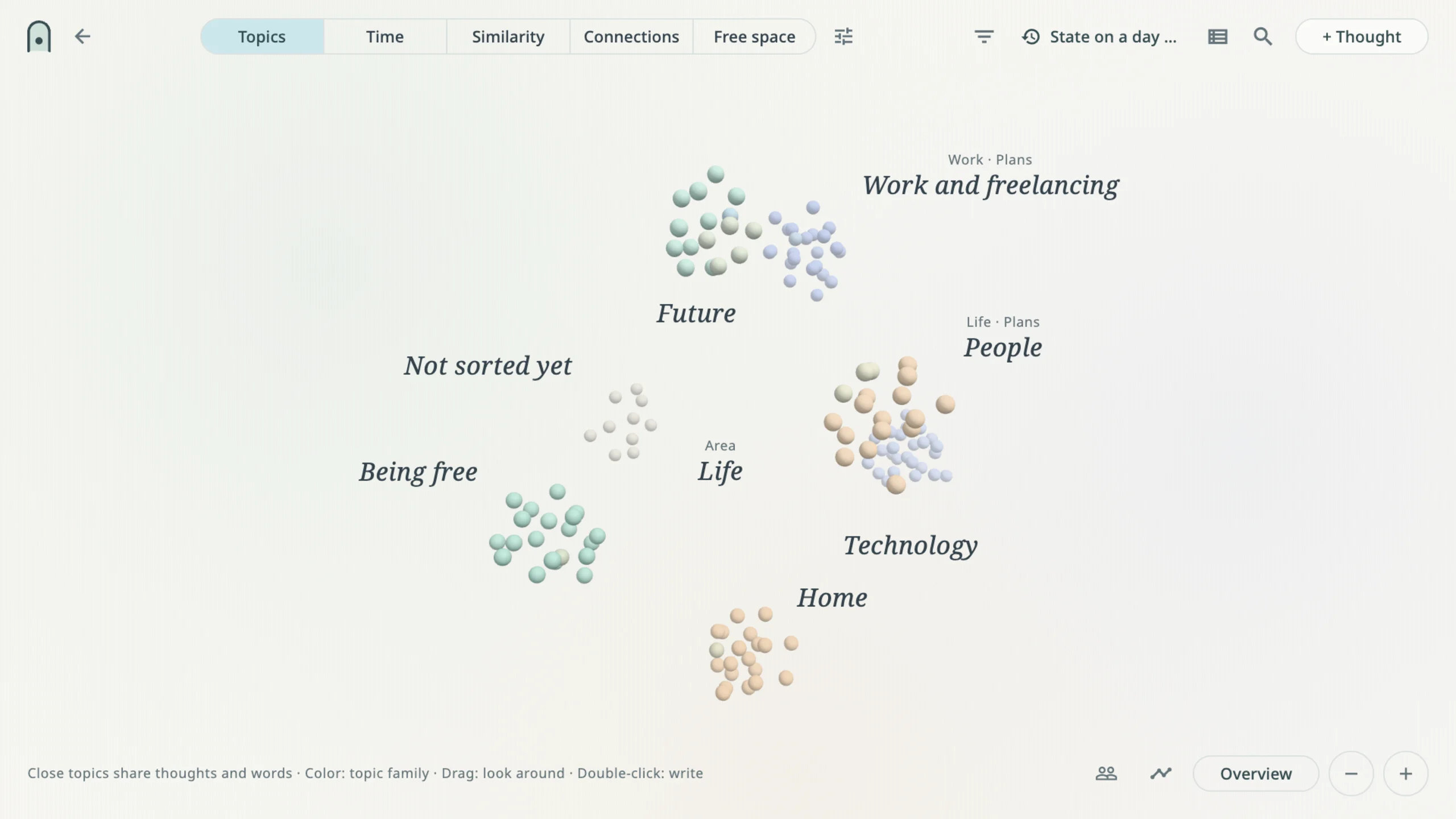
Notes apps put everything underneath everything else, and what lies underneath gets sorted by date — by the one thing that says least about a thought. Balane Mind puts it into a real three-dimensional space instead. You turn it, come closer, step back. The closer you come, the more is there: first a colour, then a heading, then the whole text. And nothing moves on its own — the space is still until you touch it.
Five arrangements, one collection
The same notes, set out five different ways. Nothing is copied, nothing is kept up twice.
- Topics — What shares words, connections and topics sits together. Areas like “Life” or “Work” float above the topics; a topic that belongs to two areas lies between them.
- Time — A landscape. Time from left to right, topics as rows into the distance, year lines on the ground and “today” as a plane of glass in the middle of it.
- Similarity — Groups that come out of the words themselves, named after what they have in common.
- Connections — The relations you drew yourself. Only those.
- Free space — Your own arrangement. What you put somewhere stays there, even as the collection grows.
Time that need not be exact
Most of what you remember has no date. A note written today may be about “summer 2018”, and the app remembers both: when you wrote, and what the text speaks of. Periods, open ends and the future — “January to June 2028” — are as valid as a day in a calendar. Two notes from different years can mean the same period, and in the time view that is exactly where they stand.
What remains when you change something
Every change to a text keeps the version before it. Under “development” stands what you wrote back then, next to what you write today. A technical guess from 2020, an addition from 2024 and the contradiction from 2026 stand beside each other rather than on top of each other — and you name the relation yourself: “adds to”, “I see this differently now”. The app never decides that meaning for you.
Suggestions that say what they rest on
While you write, the app suggests topics and writes the reason beside them: may fit … · in common: … Those are the words the suggestion stands on — you can weigh it instead of having to believe it. Nothing is set without you choosing it, existing thoughts are not moved when something new arrives, and if the whole thing bothers you, you switch it off.
No language model. None built in, none connected.
The app works out the similarity itself, on your Mac, from the words in your own texts — classical methods, no model, no request going anywhere. That is more honest than it sounds: what comes out is closeness of words, not of meaning, and the app says so everywhere it makes a suggestion. An app that claimed to understand your thoughts would have to send them somewhere to do it.
On the device
The vault sits encrypted on your Mac. The key lives in the keychain, Touch ID opens it, and when you create the vault you get a recovery key that only you hold — write it down, it is the only way back. There is no account, no sign-in and no server. Everything works without a network, because none of it ever needed one.
Look first, decide after
You do not have to create anything to see what it looks like. The sample space is an invented collection of invented thoughts — it stores nothing, and it shows in three steps how to move around in it: turn, re-sort, read a thought. What you see there is the app with a collection that has already grown for a while. That is what yours looks like in a year.
Also
Pictures in notes. People you write about. A writing room with nothing in it but the text. Search across everything on this machine. An open import format that lets notes in from elsewhere — including a stack of documents somebody else sorted for you; the app reads the file, treats everything but title and text as a suggestion, and writes only what you confirm. A backup you hold yourself. German and English.
A file you put where you like
The vault does not have to stay in the app's private folder. You can keep it as one single encrypted file at a place you choose — in iCloud Drive, say, or in a folder that some other service synchronises. On opening, the device takes what is new there; on locking, it writes back, and any machine holding your recovery key opens that same file. The work still happens on the device; the file is the place, not the service.
Your cloud service only carries the bytes. It cannot read them: titles, texts, pictures and times are encrypted before the file exists, and the key is not inside it. The one exception is named by the app where you choose it — the protection level “Open” is expressly unprotected, so that the file can be passed on.
First release
Balane Mind is new. This is the first release, for the Mac, and it does what this page says. The built-in OneDrive sync is not switched on yet, and there is no iPhone version. What there is: the file above, and a backup that opens again on a new machine with your recovery key.
Screenshots
Frequently asked.
Is there an AI in this?
No, and none is connected either. Balane Mind compares words — which texts use the same ones, worked out on your Mac, from your own notes. That is closeness of words, not of meaning, and the app says so: every suggestion names the words it rests on. Nothing is set without you choosing it, and the suggestions can be switched off entirely.
Where do my notes live?
On your Mac, in an encrypted vault. The key lives in the keychain, Touch ID opens it, and when you create the vault you get a recovery key that only you hold. There is no account, no sign-in and no server that sees any of it. Everything works without a network.
Can I look without creating anything?
Yes. The sample space is an invented collection of invented thoughts — it stores nothing, and it shows in three steps how to move around in it. What you see there is the app with a collection that has already grown for a while. Only then do you decide whether to create a vault of your own.
What does it cost?
The app itself nothing, and that stays: Balane Mind is downloaded without paying for it. Later there is to be a paid part inside the app. What it covers is not settled yet, and until it is we claim nothing about it here — it will be on this page once it is decided.
Do my notes reach my other devices?
Through a file, yes. Instead of living in the app's private folder, the vault can be one single encrypted file at a place you choose — in iCloud Drive, for instance. On opening, the device takes what is new there; on locking, it writes back, and any device holding your recovery key opens the same file. Your cloud service only carries it; the content is unreadable to them. The built-in OneDrive sync is not switched on in this release, and there is no iPhone version yet: the first one is for the Mac.
Tech stack
- Flutter
- Dart
Platforms
- macOS
Tags
- Notes
- 3D
- Privacy
- Offline