Balane Docs
A word processor for letters, reports and minutes. Opens and saves DOCX and ODT.
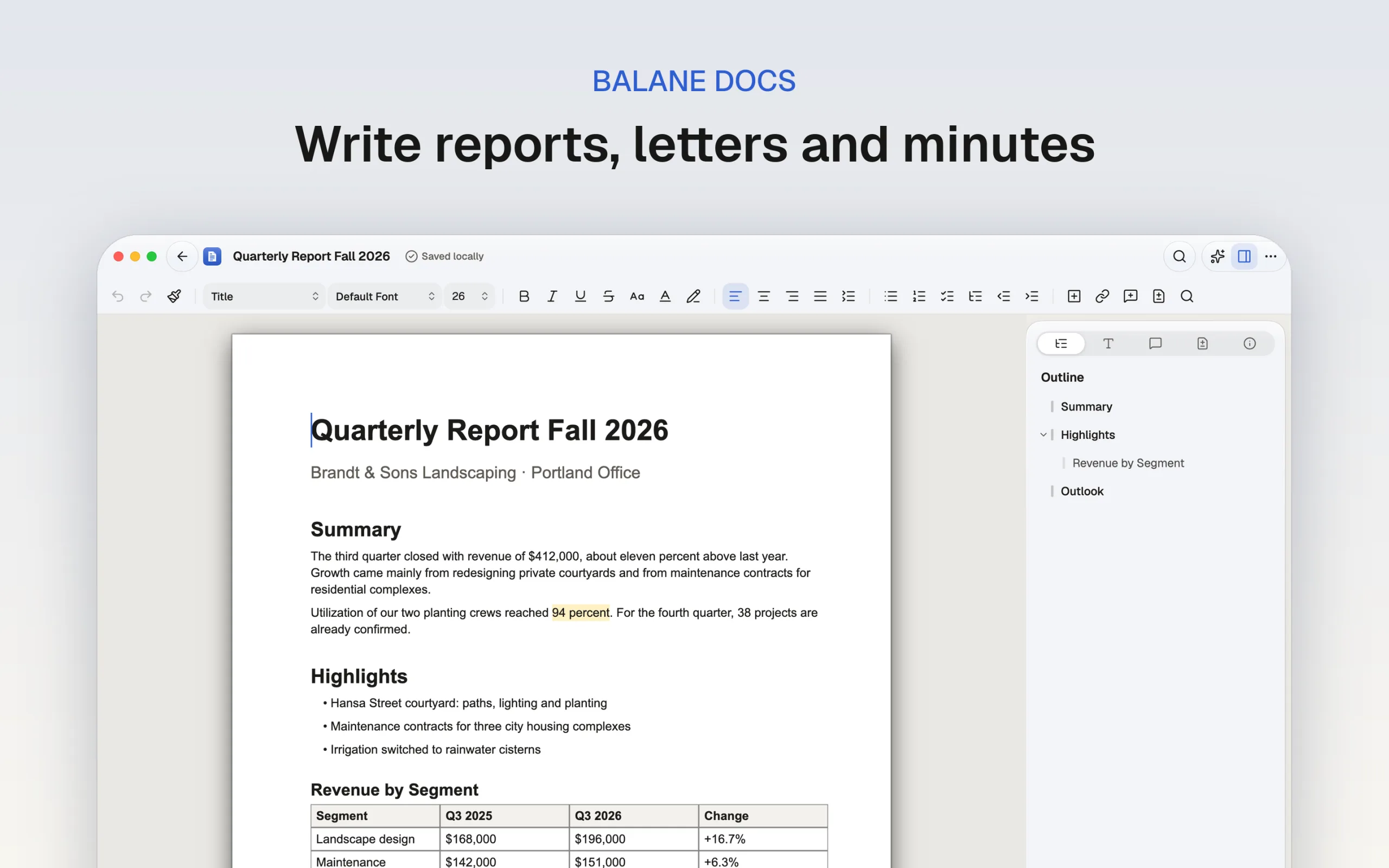
Balane Docs is the word processor of Balane Office. You start with a blank document or a template: business letter, report, minutes, CV or one of your own. You write in page view or continuous view, with styles, lists, tables, images, footnotes, headers and footers and a table of contents. Comments and track changes are included, and spell checking comes from the operating system. The app opens DOCX, ODT, Markdown and plain text and exports to DOCX, ODT, PDF, Markdown and HTML. You can edit a document together with other devices, end-to-end encrypted and without a central server. AI features are optional and use your own API key. Documents are stored on your device as .bdoc files, and no account is required. For Mac, iPhone, iPad, Android and Windows. Balane Office is a project that shows how far an office suite can be taken with AI-assisted development. The apps are free and fully usable.
Write, lay out, send
Balane Docs is for the documents that come up every day: letters, reports, minutes, CVs. The library has templates for them, including a business letter. You create your own templates with “Save as Template …” and sort them into categories.
What's in the editor
- Views: Page view with real page breaks or continuous view, zoom and page width. Formatting marks can be shown.
- Formatting: Styles, character and paragraph formats, tab stops with leaders, numbered headings, lists and checklists.
- Content: Tables (merge, split, borders), images, also in headers and footers, links, footnotes, table of contents, charts.
- Reviewing: Comments with replies, track changes, find and replace with regular expressions, word count.
- Navigator: Reorder sections by dragging, promote or demote them, expand and collapse levels.
- Spelling: The operating system's spell checker, with suggestions in the context menu and a custom dictionary.
- Versions: The app saves automatically. You can look at earlier states and restore them.
DOCX, ODT and PDF
The app opens DOCX, ODT, Markdown and plain text. It saves in its own .bdoc format and exports to DOCX, ODT, PDF, Markdown and HTML. Not every Word or LibreOffice feature has a counterpart; what carries over depends on the format.
Writing together without a server
A document can be shared with other devices. You pass on an invitation, and then the devices connect directly and exchange changes end-to-end encrypted. If no direct connection can be made, relays pass on the encrypted data. No central server holding the document is involved.
AI only when you switch it on
With your own Anthropic API key, the AI can rephrase, shorten, continue, summarize, outline and proofread. Results appear as suggestions, optionally as tracked changes, and are only applied once you accept them. Without a key the AI is off, and the app is still fully usable.
Part of Balane Office
Tables and charts from Balane Sheets, Reports and Forms can be inserted as linked content and refreshed. On iPhone the text reflows in a view of its own, and a formatting bar sits above the on-screen keyboard.
Support
Questions and bug reports go to support@balane.tech.
Screenshots
Common questions.
How much does Balane Docs cost?
Nothing. Balane Docs is free and fully usable, with no subscription and no in-app purchases.
Do I need an account?
No. There's no sign-in and no Balane account. You open the app and start.
Where are my documents stored?
On your device, as .bdoc files. The app saves automatically and keeps a backup copy. If a file sits in a folder that iCloud Drive, OneDrive or another service syncs, that service carries it under its own terms. Nothing goes to Balane.
Do I have to use the AI?
No. The AI features stay off until you add your own Anthropic API key in the settings. Requests then go directly from your device to Anthropic (or to an Anthropic-compatible service you enter yourself), containing only what the app puts together for that request, and are billed to your key. Nothing the AI suggests is applied until you accept it. Without a key, the app is fully usable.
Can I work on a file together with others?
Yes. You invite other devices with an invitation, and then they connect to each other directly, end-to-end encrypted and without a central server. When no direct connection can be made, relays pass on the encrypted data; they see IP addresses but no content. Until you share a file or accept an invitation, the app opens no connection for this.
Tech stack
- Flutter
- Dart
- Iroh
Platforms
- macOS
- iOS
- iPadOS
- Android
- Windows
Tags
- Balane Office
- Word Processor
- Documents
- Collaboration
Related apps.
 Coming soon
Balane Sheets
Spreadsheets with more than 340 functions, charts and filters.
 Coming soon
Balane Slides
Presentations with templates, charts and presenter view.
 Coming soon
Balane Paperwork
View, annotate, fill in, sign and redact PDF files.