Balane Slides
Presentations with templates, charts and presenter view.
Balane Slides is the presentation app of Balane Office. There are templates for project status, introduction, training, report and meeting, plus eight themes and slide masters with layouts. Slides take text boxes, shapes, images, tables and charts, and the slide panel groups them into sections. Animations and transitions are included. You present full screen with presenter view: current and next slide, notes, elapsed time, laser pointer and pen. The app opens PPTX and ODP and exports to PPTX, ODP, PDF and PNG. You can edit a presentation together with other devices, end-to-end encrypted and without a central server. AI features are optional and use your own API key. Presentations are stored on your device as .bslides files, and no account is required. For Mac, iPhone, iPad, Android and Windows. Balane Office is a project that shows how far an office suite can be taken with AI-assisted development. The apps are free and fully usable.

From outline to presentation
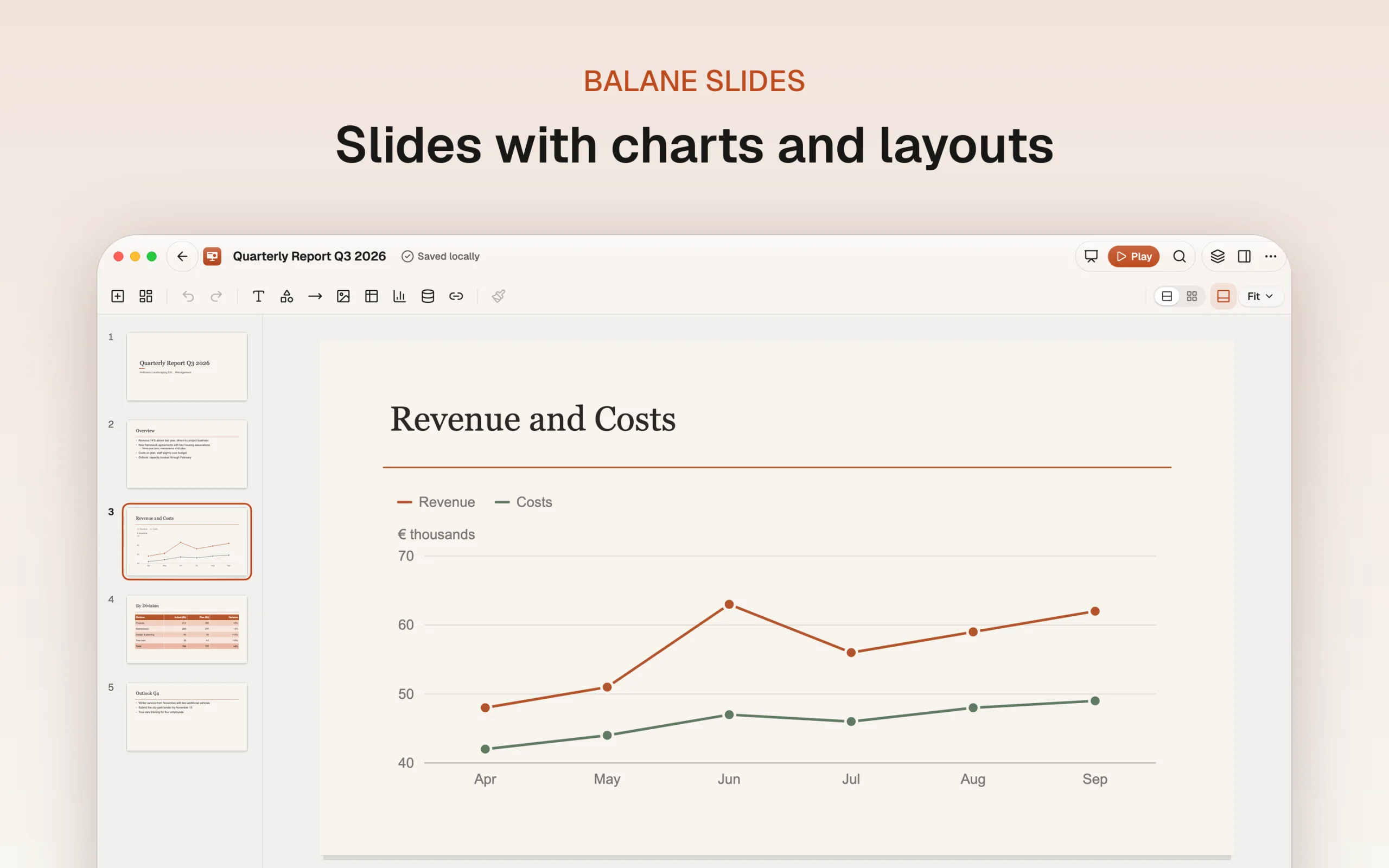
Balane Slides starts with a template for project status, introduction, training, report or meeting, with a blank presentation or with a template of your own. Eight themes set the color scheme, font pairing and background; slide masters and layouts with placeholders keep the slides consistent.
Designing slides
- Slide panel: Sections, drag to reorder, hide, duplicate, and a slide sorter.
- Objects: Text boxes, more than 30 shapes, lines and connectors, images with cropping and alt text, tables and charts in the theme's colors and fonts.
- Arranging: Align, distribute, layers, rotate, group, guides and a selection pane listing every object on the slide.
- Motion: Entrance, emphasis and exit animations and transitions, including “Morph”, where objects with the same name glide to the next slide.
- Formats: 16:9, 4:3, A4 or custom, headers and footers, backgrounds from color, gradient or image.
Presenting with presenter view
In full screen you navigate with the usual keys or by swiping. Presenter view shows the current and next slide, your notes, elapsed time and the clock. Laser pointer, pen and highlighter draw on the slide, and rehearse timings measures the time per slide.
PPTX, ODP and PDF
The app opens PPTX and ODP and exports to PPTX, ODP and PDF, including notes pages and handouts, plus single slides or all slides as PNG. You work in its own .bslides format, with automatic saving and version history.
Working on slides together without a server
A presentation can be shared with other devices. After the invitation, the devices connect directly and exchange changes end-to-end encrypted. If no direct connection can be made, relays pass on the encrypted data.
AI only when you switch it on
With your own Anthropic API key, the AI builds a presentation from an outline, tidies up a slide, shortens text, writes speaker notes or turns a table into a chart. You see its suggestions first as slide thumbnails; only what you accept is applied. Without a key the AI is off.
Part of Balane Office
Tables and charts from Balane Sheets, Reports and Forms can be inserted as linked content and refreshed.
Support
Questions and bug reports go to support@balane.tech.
Screenshots
Common questions.
How much does Balane Slides cost?
Nothing. Balane Slides is free and fully usable, with no subscription and no in-app purchases.
Do I need an account?
No. There's no sign-in and no Balane account. You open the app and start.
Where are my presentations stored?
On your device, as .bslides files. The app saves automatically. If a file sits in a folder that iCloud Drive, OneDrive or another service syncs, that service carries it under its own terms. Nothing goes to Balane.
Do I have to use the AI?
No. The AI features stay off until you add your own Anthropic API key in the settings. Requests then go directly from your device to Anthropic (or to an Anthropic-compatible service you enter yourself), containing only what the app puts together for that request, and are billed to your key. Nothing the AI suggests is applied until you accept it. Without a key, the app is fully usable.
Can I work on a file together with others?
Yes. You invite other devices with an invitation, and then they connect to each other directly, end-to-end encrypted and without a central server. When no direct connection can be made, relays pass on the encrypted data; they see IP addresses but no content. Until you share a file or accept an invitation, the app opens no connection for this.
Does Balane Slides run on Windows too?
Yes. On Windows, Balane Slides is in the Microsoft Store. Installed from there, it skips the SmartScreen dialog and updates itself. If you don't use the Store, the same build is available as a signed direct installer here.
Tech stack
- Flutter
- Dart
- Iroh
Platforms
- macOS
- iOS
- iPadOS
- Android
- Windows
Tags
- Balane Office
- Presentations
- Charts
- Collaboration
Related apps.
 Coming soon
Balane Sheets
Spreadsheets with more than 340 functions, charts and filters.
 Coming soon
Balane Docs
A word processor for letters, reports and minutes. Opens and saves DOCX and ODT.
 Coming soon
Balane Reports
Analyze data from CSV, XLSX and SQLite and present it as a report.