The Second Look
Catch embarrassing document mistakes before your client does.
The Second Look is the second look at your document before it goes out — a fully local Word add-in for law firms. Before you send, it catches the small things that make a partner lose confidence in you: wrong client, inconsistent defined terms, conflicting case numbers, leftover placeholders, broken cross-references and exhibits, wrong signature block, open comments, tracked changes, numbering gaps, mixed date formats, metadata and hidden content. It flags — you decide; fixes happen only on confirmation, your text stays yours. German, Austrian, Swiss, UK or US contracts, in any language. No legal assessment, no cloud, no AI at runtime, no document transmission, no storage.

Business customers only
7 days free, then €199 / year. Cancel anytime.
All prices are net, plus VAT.
Secure payment & invoice via Lemon Squeezy. Billed in EUR — your bank handles the conversion. License key arrives by email.
What slips through is never the legal question
The brief is solid, the argument lands. And on the way out, something slips through that no one should see — the wrong party name on page 12, the case number that doesn't match the rest, the defined term spelled three different ways, the signature block left over from the last deal. None of it takes legal expertise, just two seconds of inattention. And these are exactly the small things that make a partner lose confidence in you — and a client lose confidence in the firm.
That's what The Second Look is for: the second look at the document before you hit "Send".
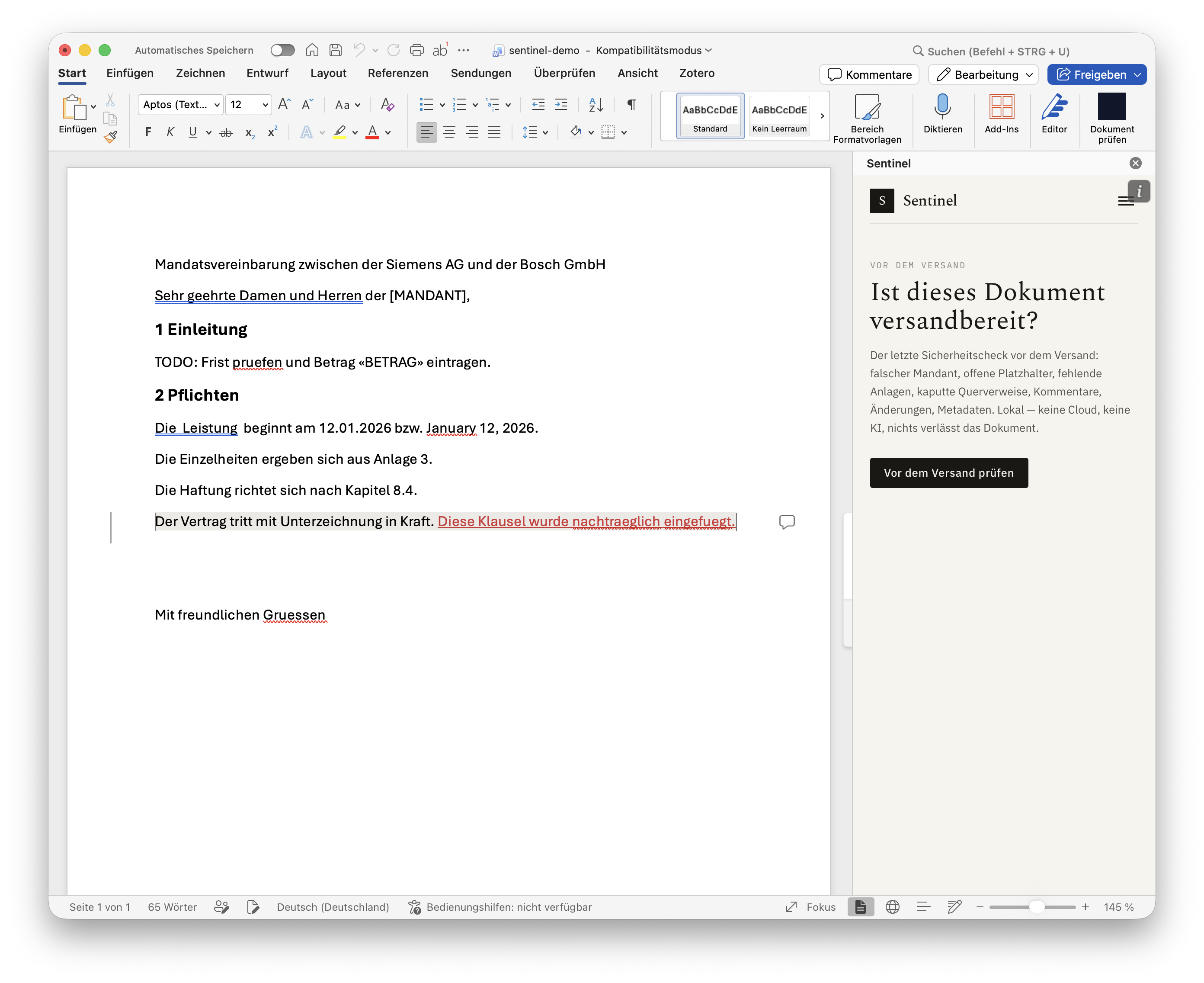
What it checks
One click in the Word add-in checks the document against the mistakes experienced associates name again and again:
Send-blockers
- Parties & client — is the opponent, defendant or client still named on page 12 the way they were on page 3? Is there a stray company from the template sitting in the text?
- Defined terms — used before they're defined, never defined, or spelled inconsistently
- Case numbers — a typo, or a file number from another matter wandering through the document
- Leftover placeholders —
[CLIENT],XXX, template residue - Exhibits & cross-references — a reference to an exhibit or clause that doesn't exist
- Signature block — wrong signatory, missing party
Before it leaves the building
- Open comments and tracked changes someone can still read
- Metadata and hidden content that ships with the file
- Numbering gaps, mixed date formats and inconsistent formatting
The list keeps growing — but it only ever answers one question: is this document clean, consistent and ready to send? The Second Look does not assess legal quality and gives no legal advice.
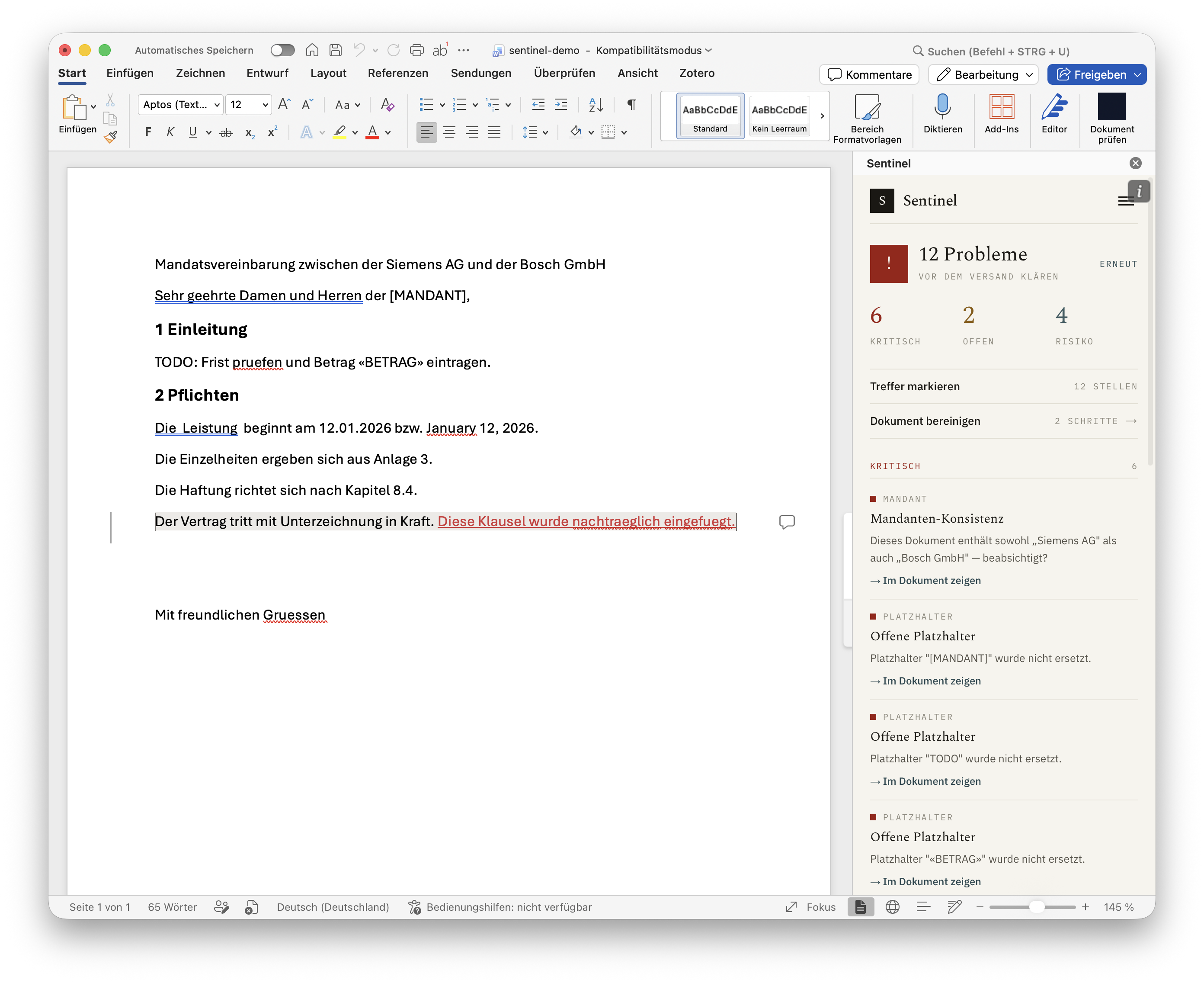
Find, don't rewrite — you decide
The Second Look is not an AI formatter and not a ghostwriter. It never changes anything silently. Every finding takes you to the exact spot, shows you precisely what would change, and waits for your OK. Changing a name, a date or a defined term can shift the meaning — that call stays yours. The tool is perfect at finding; fixes happen only on confirmation, with one click. Your text stays yours.
Any language, any jurisdiction
German, Austrian, Swiss, UK or US contract — in any language. A German GmbH inside an English-language agreement is caught just like a Swiss SA, a UK Ltd or an Austrian OG. Detection is not tied to the document's language — because a German firm writes English contracts too.
Fully local. No cloud risk.
For law firms this is the core: the document does not leave your device. No cloud, no AI at runtime, no transmission, no storage — the check runs entirely inside the add-in on your machine.
That also means: no data processing agreement required, no debate with your data protection officer about third-country transfers. Client confidentiality stays client confidentiality.
Who it's for
For law firms, legal departments and anyone who regularly sends formal documents where an embarrassing slip gets expensive. The Second Look doesn't replace your professional final review — it catches what that review tends to overlook: the details.
How it works
- Install the add-in in Word and activate it.
- Open a document and run The Second Look.
- Walk through the findings — each linking to the exact spot, many with one-click fixes — and send clean.
Start with a 7-day free trial, then an annual subscription — cancel anytime.
Tech stack
- TypeScript
- Office.js
- Next.js
Platforms
- Microsoft Word
Tags
- Legal Tech
- Word Add-in
- Document QA
Articles about this app.
Legal.
Purchase and payment are handled by Lemon Squeezy as Merchant of Record (the legal seller). Their terms and refund policy govern the purchase; use of the software is governed by the license agreement below. Lemon Squeezy buyer terms.