Before you write a single line
Most process documentation fails not on form, but because nobody settled two questions up front: What for? and From where to where? Skip those and you'll produce either a 40-page document nobody reads, or a three-line note that carries nothing.
This article is the practical companion to the process documentation guide: a copy-paste template, six steps, and a concrete example. By the end you'll know not just what belongs in process documentation, but how to create it so it still holds true a year from now.
Disclosure: At Balane we build FlowVisual, a desktop app (Windows & macOS) that runs processes as a simulation. It appears at the end — the template and the steps work without any tool, on paper just as well as digitally.
The template: what belongs in any process documentation
Copy this structure into Word, Confluence, Notion — whatever. It's deliberately compact: a profile (the head), a step table (the body), and three short appendices (exceptions, metrics, versioning).
1. Process profile
| Field | Content |
|---|---|
| Process name | Short and unambiguous, e.g. "Incoming invoice to payment" |
| Purpose | One sentence: why this process exists |
| Trigger | What starts the process |
| Output | How you recognize success |
| Scope | Start and end point — and what is not part of it |
| Process owner | A named person |
| Version / next review | Date + responsible person |
2. Step table (the core)
| # | Step | Who (role) | System | Decision? | Duration | Provenance |
|---|---|---|---|---|---|---|
| 1 | Receive invoice | Accounting | Email / DMS | – | 2 min | measured |
| 2 | Verify content | Department | ERP | Amount > €5,000? | 15 min | estimated |
| 3 | Approve | Cost center lead | ERP | rejected → back to 2 | 5 min | estimated |
| 4 | Trigger payment | Accounting | Banking | – | 3 min | measured |
The provenance column (estimated / calculated / measured) is the most inconspicuous but most important part. It decides whether your numbers survive a question later.
3. Three short appendices
- →Exceptions & edge cases: "What if the invoice has no PO number?" This is where the knowledge only experienced staff carry in their heads ends up.
- →Metrics: volume (e.g. 800 invoices/month), total lead time, error/rework rate.
- →Versioning: who changed what, when. A three-column table is enough.
That's the whole template. Most processes need no more — and less won't hold.
The six steps
Step 1: Define purpose and scope
First, settle what you're documenting for — onboarding, audit, standardization, or optimization. The purpose drives everything else: depth, format, tone. An audit document is plain and complete; an onboarding document is vivid and guides.
Then the scope: where does the process begin, where does it end? Write down explicitly what is not part of it. A scope set too wide is the most common reason documentation projects fizzle out.
Step 2: Ask the right people
The most important step — and the one most often skipped. Document the process with the people who run it every day, not from imagination at a desk. The to-be process in management's heads and the lived as-is process almost always diverge, and the gap is exactly where the problems sit.
In practice: a facilitated conversation or a short 60–90 minute workshop per process. You ask, they tell, you sketch live. The right question isn't "how does this run?" but "what was the last time it went wrong?"
Step 3: Capture the as-is state
Go through the step table in order. For each step: who does it, with which system, is there a decision/branch, how long does it take? Stay at the altitude the purpose demands — not every click, but the traceable task.
Important: capture the exceptions in parallel. Every time someone says "normally..." or "except when...", that belongs in the appendix.
Step 4: Add metrics with provenance
Enter durations, volumes, and error rates — and mark the provenance on every value: measured (you timed it or pulled it from the system), calculated (derived from other values), or estimated (someone gave a gut feeling). These three levels are the difference between documentation that impresses and documentation that holds. Nobody expects everything to be measured — but everyone has the right to know what was guessed.
Step 5: Review with the participants
The first version is always wrong. That's not a flaw, it's the normal course. Send the docs to the participants or walk through them in a second short session. In my experience the most valuable exceptions only surface here, because the finished picture triggers the memory.
Step 6: Keep it alive
The step that decides between value and dust. Settle three things concretely:
- →Owner: a named person, not "the department".
- →Review cadence: a fixed date (e.g. every six months) plus event-based triggers — a system change, a reorganization, a new legal requirement.
- →A low-friction location: where the work happens. Documentation you have to go and find won't get maintained.
One end-to-end example: employee onboarding
Short and concrete. Process: a new employee starts.
- →Trigger: signed contract is in.
- →Output: the employee can work on day one (access, hardware, induction).
- →Steps (condensed): (1) HR creates the personnel file → (2) IT sets up accounts & hardware → (3) manager plans the induction → (4) facilities prepares the workspace → (5) day 1: welcome & induction.
- →Decision: remote or on-site? Branches at steps 2 and 4.
- →Exception: what if the hardware isn't ready in time? → loaner from the pool.
- →Metric: lead time "contract to able to work" — target: ≤ 5 working days. Current: an estimated 8 days, because step 2 often waits on step 1.
That last sentence is exactly the bridge from documentation to insight: the docs show that step 2 waits. But how much that costs in time and money — and what parallelizing the two steps is worth — only the next level shows.
Common mistakes when documenting
- 01Invented at a desk instead of captured on site. Without the people doing the work, you're documenting fiction.
- 02Too much detail. If the docs contain every mouse click, nobody reads them and nobody maintains them.
- 03Numbers with no provenance. Selling an estimate as fact falls apart at the first critical question.
- 04No owner. Without a named person, the docs are heading for staleness from day one.
- 05Done = filed away. Documentation is never "done". Treat it as a one-off project and you've already lost it.
From template to a solid model
A filled-in template is a good baseline — but it's static. It says "step 2 often waits on step 1", but not how often, how expensive, and what a change would be worth. Those questions are answered only by a model that runs.
That's exactly why we built FlowVisual. You transfer the steps from your template into a few building blocks, attach the metrics (with the same provenance logic: estimated / calculated / measured) and hit play. Load flows through, queues build up, the bottleneck tips from teal to red.
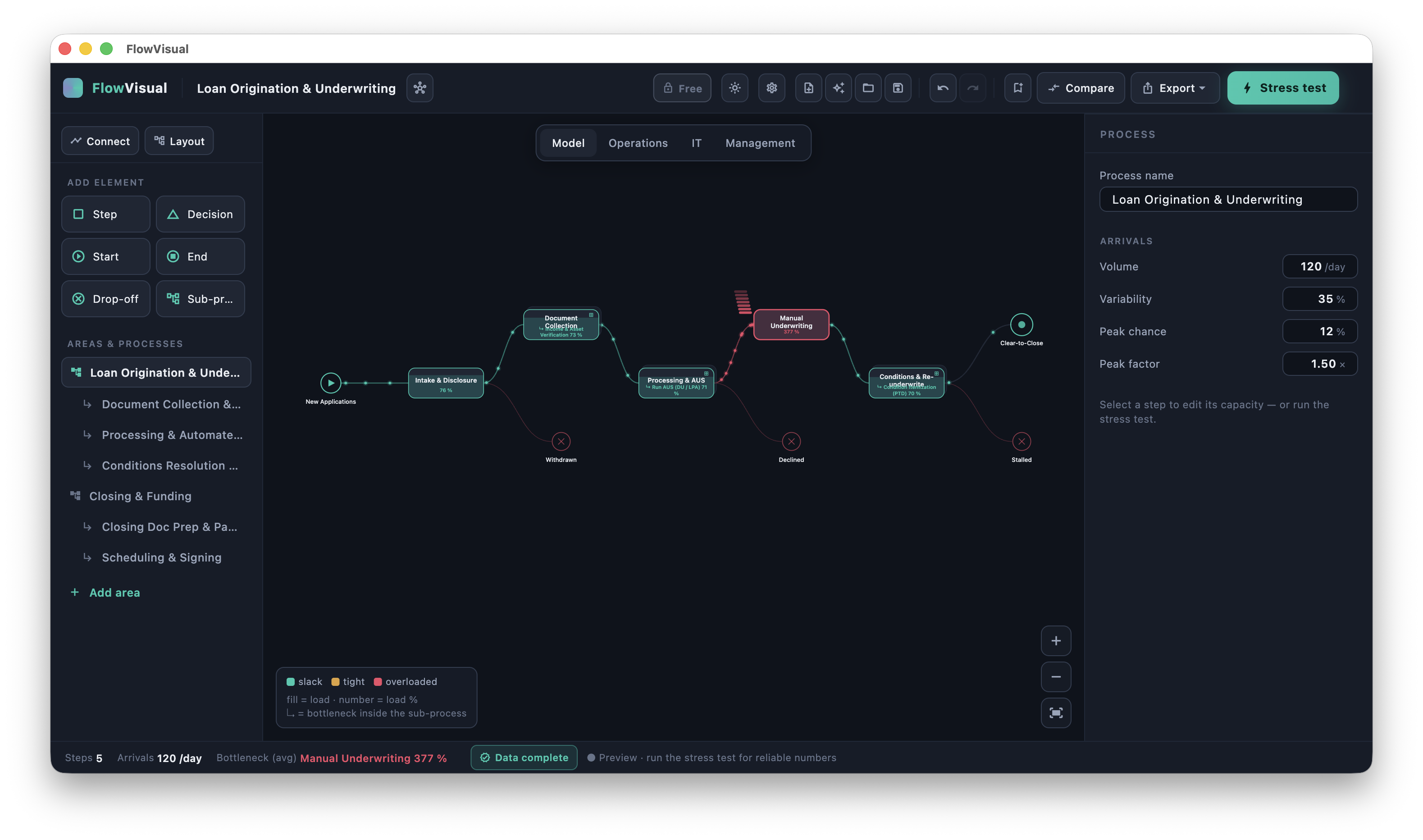
Then the real value: change one number — add a person, automate a step — and the model recalculates before/after in time and euros, with a range instead of false precision. "We think this helps" becomes "here's the math". FlowVisual runs natively on Windows and macOS, locally (no cloud, no sign-up), and is available as a full version (v0.9) via direct download — 14-day free trial, then €99/year for 3 licenses (net, B2B). Details on the product page.
Frequently asked questions
How long does it take to document a process?
For a manageable process (4–8 steps): a 60–90 minute capture conversation plus about an hour of follow-up and a short review. For complex, cross-departmental processes with many exceptions: half a day to a full day plus data gathering. The most time-consuming part is almost always measuring metrics instead of estimating them.
Which tool should I use for the template?
To start, the tool you already have — Word, Confluence, Notion. More important than the software is getting the structure right (profile + step table + appendices) and putting the docs where the work happens. When specialized software is worth it is covered in the tool comparison.
Should I document the as-is or the to-be process?
Always the as-is first — how it really runs today, including the uncomfortable shortcuts and exceptions. Only on that honest foundation is a to-be process worthwhile. Document the ideal directly and you describe a process nobody lives.
How detailed should the step table be?
Detailed enough that a new hire could run the process correctly afterwards — no more. For most purposes the "task" level is right (e.g. "verify invoice content"), not the "mouse click" level. If the goal is automation, you need every decision point.
What about processes that run differently every time?
If a process genuinely runs differently every time, that's often the real problem, not the documentation. Document the most common path as the main line and the deviations as exceptions. When the list of exceptions grows longer than the main line, you have a standardization case, not a documentation case.
Conclusion
Creating good process documentation isn't about the prettiest tool — it's about three things: settle purpose and scope up front, capture the as-is with the people who run it, and keep the docs alive instead of filing them away. The template above gives you the skeleton; the six steps give you the path.
And if the filled-in template should become more than a document — a model that runs, shows bottlenecks, and carries a € case — that's exactly what we built FlowVisual for. FlowVisual runs on Windows and macOS — 14-day free trial, then €99/year for 3 licenses (net, B2B).
Feedback welcome at contact@balane.tech.