Why most process documentation is dead on arrival
Almost every company I see in consulting has documented its processes at some point. And in almost every one, that documentation sits in a SharePoint folder nobody has opened since the day it was written. It was correct — on that day. Three months later it's drifting, and after a year it's actively dangerous, because it claims something nobody does anymore.
That's the core problem with process documentation: writing it is the easy 20%. Keeping it alive, findable, and useful is the hard 80% — and that's exactly where most initiatives fail.
This guide is for people who document processes not for the sake of it, but to achieve something: faster onboarding, passing audits, finding bottlenecks, automating. It gives you:
- →a clear definition — and how it differs from process modeling and process optimization,
- →the elements every serious process documentation should contain,
- →the methods at a glance (prose, flowchart, BPMN, swimlane, value stream) with the "when which one?" question answered,
- →the most common mistakes — and how a dead document becomes a living, decision-ready model.
Disclosure: At Balane we build FlowVisual, a desktop app (Windows & macOS) that doesn't just document processes but runs them as a simulation. It appears further down — but the method section works without any tool, and the recommendations stay honest.
What is process documentation?
Process documentation is the structured, traceable description of how a recurring activity in a company actually runs — who does what in which order, with which inputs, systems, decisions, and outputs.
The important thing is to separate it from two neighboring terms that get confused constantly:
- →Process documentation answers: How does it run today (or how should it run)? It captures the state.
- →Process modeling is the technique you use to do that — the formal language (BPMN, swimlane, value stream). More on that in our process modeling software comparison.
- →Process optimization is the next step: improving the documented process. Without clean docs, that's guesswork.
In short: documentation is the map. Modeling is the cartography. Optimization is the trip planning. This article is about the map — and how to stop it from going stale.
What is it for? The four real purposes
Documenting a process "because that's what you do" is the surest way to produce a dead document. Before you write a line, settle the purpose — it determines depth, format, and update cadence:
- 01Knowledge retention & onboarding. So the process doesn't live only in the head of someone retiring in two years. Goal: a new hire can run the process after reading it.
- 02Compliance & audit. ISO 9001, GDPR records of processing, tax-relevant procedure docs, industry-specific evidence. Goal: an auditor can see the process is defined, controlled, and followed.
- 03Standardization & quality. So the same process runs identically across three locations. Goal: less variance, fewer errors.
- 04Analysis & improvement. Finding bottlenecks, cutting lead times, automating. Goal: the docs are the foundation for a well-grounded change.
Most documentation fails because it tries to serve all four purposes at once and therefore serves none of them well. An audit document is not the same as an onboarding guide. Pick one.
Which elements belong in process documentation?
Regardless of format, there's a core that should appear in any solid process documentation. This checklist is also the skeleton of the template in our step-by-step article:
- →Process name & purpose — one sentence explaining why this process exists.
- →Trigger — what starts the process (an incoming email, an order, a deadline).
- →Output — how you know the process has completed successfully.
- →Scope — where the process begins and ends, and what is not part of it.
- →Roles & responsibilities — ideally as a RACI (Responsible, Accountable, Consulted, Informed).
- →Process steps — the actual sequence, each with actor, task, and system used.
- →Decisions & branches — the "if-then" points where the path forks.
- →Exceptions & edge cases — what happens when something goes wrong. This is where the knowledge only experienced staff carry usually lives.
- →Metrics — lead time, processing time, volume, error rate. With provenance: estimated, calculated, or measured.
- →Systems & interfaces — which tools, which handoffs, where the media breaks are.
- →Versioning — current version, author, last review, next review. Without this, every document rots.
The last two — metrics with provenance and versioning — are the difference between documentation that looks impressive and documentation that survives a critical question.
Which method when? BPMN, swimlane, value stream & co.
There is no single right form. There's the right form for your purpose:
| Method | Strength | Weakness | Fits |
|---|---|---|---|
| Prose / SOP | Fast, anyone can read it, ideal for work instructions | Gets messy with branches, no overview | Onboarding, simple linear flows |
| Flowchart | Instantly understandable, shows branches | No standard, no metrics | Quick sketches, communication |
| Swimlane diagram | Shows who does what — handoffs become visible | Can get wide with many roles | Cross-departmental processes |
| BPMN 2.0 | ISO standard, exact logic, automatable | Learning curve, easily lost in detail | Compliance, automation, IT |
| Value stream map | Shows where time and money are lost | No decision logic | Optimization, Lean |
Rule of thumb: For pure knowledge retention, a good SOP with an embedded swimlane is often enough. For compliance and automation, BPMN earns its keep. If you want to optimize, a value stream map is usually the more honest starting point because it makes the business case visible.
Don't get stuck on the notation question. A consistently maintained SOP beats a perfect BPMN diagram nobody updates.
How process documentation gets made — the short path
The full guide with a template is in a separate article. In brief, it's six steps:
- 01Define purpose and scope — what for, from where to where.
- 02Ask the right people — capture the process with the people who run it, don't invent it at a desk. The documented to-be process and the lived as-is process often diverge alarmingly.
- 03Capture the as-is state — steps, actors, systems, decisions, exceptions.
- 04Add metrics — with honest provenance labeling.
- 05Review with the participants — the first version is always wrong. That's normal.
- 06Keep it alive — name an owner, set a review date, define triggers for updates (e.g. a system change).
Step 6 is where nearly everyone fails — and the only one that decides whether the whole exercise is worth anything.
The five most common mistakes
- 01Documenting the to-be process nobody lives. If the docs only describe how it should be, they're fiction. Capture the as-is — including the uncomfortable parts.
- 02Too much detail. Nobody reads a 40-page document. Document at the altitude the purpose demands — not every mouse click belongs in it.
- 03No provenance on numbers. "The step takes 8 minutes" — measured or guessed? Without that label, no metric is reliable.
- 04No owner, no review date. A document without a named owner is dead before the ink dries.
- 05Static instead of dynamic. A diagram shows one state. A real process has queues, load spikes, variation — which a picture can't show.
The last point is worth taking seriously.
From dead document to living model
This is where the real leap happens. Classic process documentation — whether Word, Visio, or BPMN — is static. It shows the process as a still frame. But the questions that actually matter in the room are dynamic:
- →Where does work pile up when volume rises 30%?
- →Which step is the binding bottleneck — and how often?
- →What's it worth, in euros and time, to automate that one step?
A still frame can't answer that. So we built FlowVisual: you document the process from a few building blocks — and hit play. Work flows through the model as load, queues build up, the bottleneck tips from teal to red.
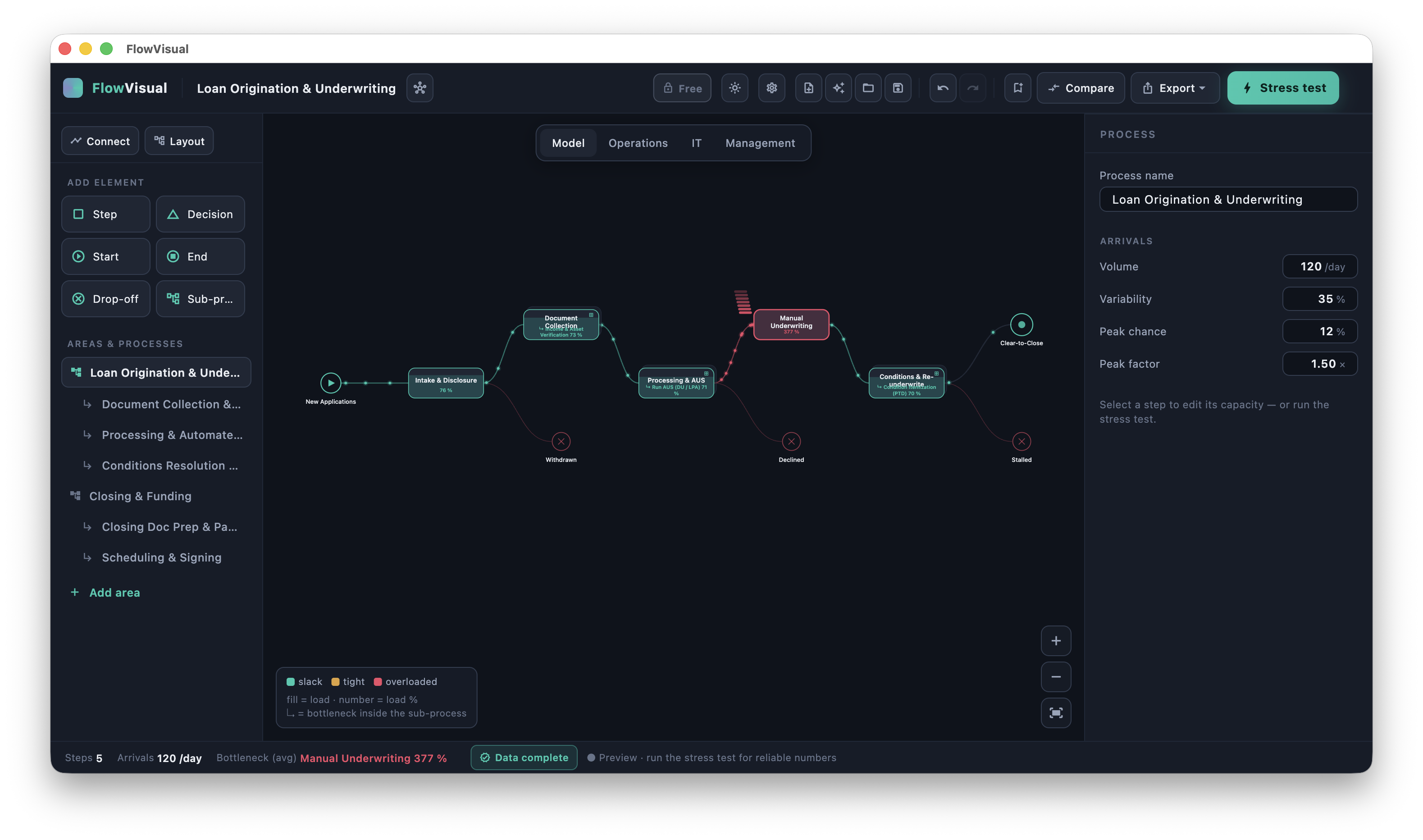
From that same documentation you can derive a business case — not as a gut feeling, but with a discrete-event simulation and Monte Carlo runs underneath. Every value carries its provenance (estimated / calculated / measured), and the result comes with a range instead of false precision.
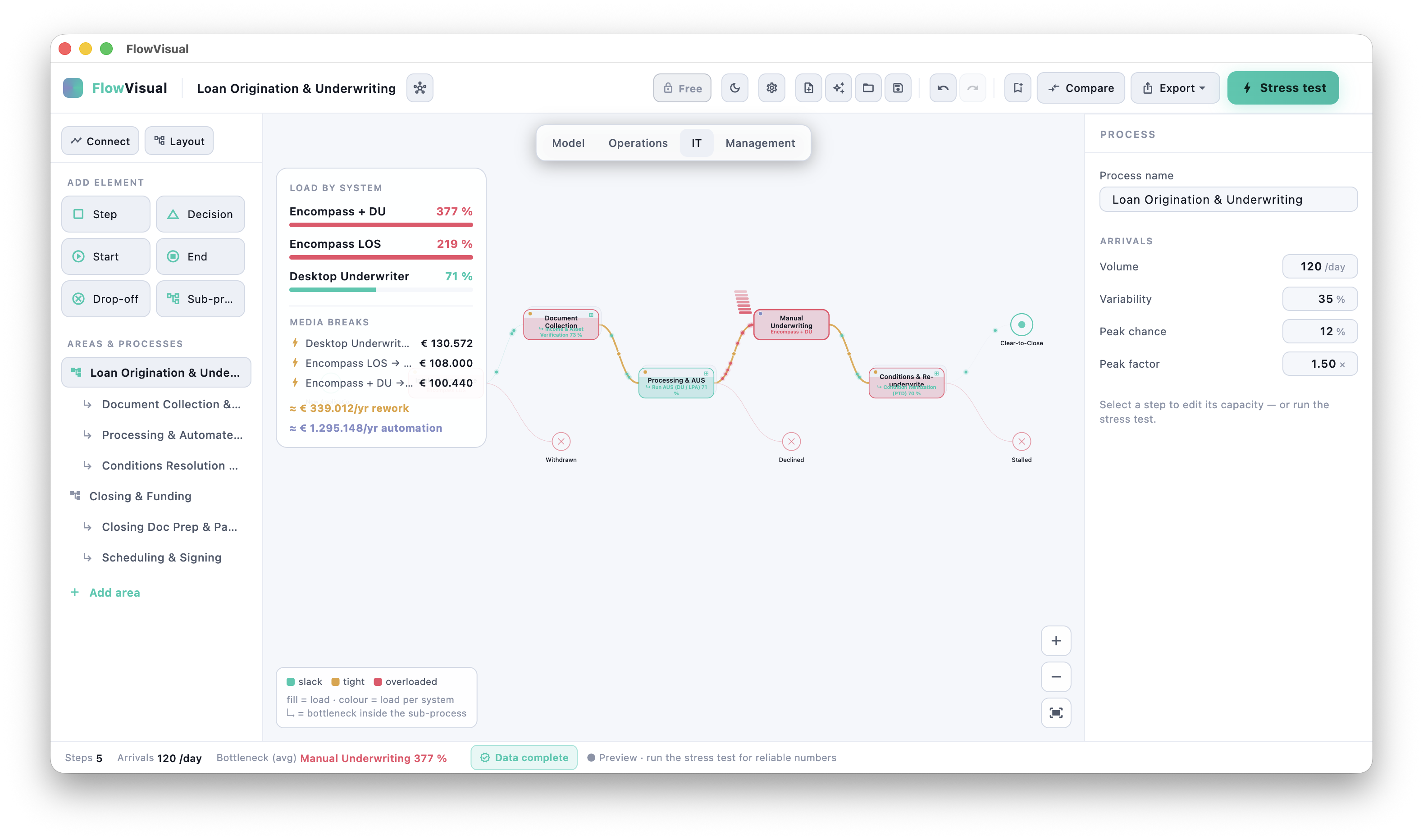
That's the idea: process documentation isn't the end, it's the beginning. Once it exists as a living model, it becomes a tool for decisions — instead of a document in a drawer. FlowVisual runs natively on Windows and macOS, fully locally (no cloud, no sign-up), and is available as a full version (v0.9) via direct download — 14-day free trial, then €99/year for 3 licenses (net, B2B). More on the product page.
Tools for process documentation
From Word and Confluence through draw.io and Lucidchart to Signavio and FlowVisual — the tool landscape is large, and the right one depends on the purpose. The full comparison with honest verdicts is in Process Documentation Software: 7 Tools Compared.
The short version: for pure text docs, a good wiki is enough. For diagrams, draw.io is free. For compliance and a repository, a BPMN tool earns its place. And if the docs should actually do something — simulate, show bottlenecks, carry a € case — you need a simulation tool.
Frequently asked questions
What's the difference between process documentation and process modeling?
Process documentation is the result — the traceable description of how a process runs. Process modeling is the method and technique you use to create that description, often with a formal language like BPMN. You document a process by modeling it. More in the process modeling software comparison.
How detailed should process documentation be?
As detailed as the purpose demands — and not one step more. For onboarding, the "task" level is often enough, not "mouse click". For automation you need every decision point. A good test: if a new hire can run the process correctly after reading it, the depth is right.
Who should document the processes?
Not management at a desk, and not an external consultant alone. The most reliable documentation is created with the people who run the process every day — facilitated by someone who knows the method and asks the right questions. The people doing the work know the exceptions nobody else does.
How do you keep process documentation up to date?
Three levers: (1) A named owner per process. (2) A fixed review cadence (e.g. every six months) plus event-based triggers (a system change, a reorganization). (3) Anchor the docs where the work happens — documentation you have to go and find won't get maintained. The less friction to update, the higher the chance it actually happens.
Which standards require process documentation?
Several. ISO 9001 requires documented information for quality-relevant processes. The GDPR requires a record of processing activities (Art. 30). Tax regulations (in Germany, the GoBD) require procedure documentation for tax-relevant processes. Depending on the industry, more apply. Important: an audit-grade document has different requirements than an onboarding document — settle the purpose first.
Is software worth it, or is Word enough?
For a handful of simple, stable processes, Word or a wiki is perfectly fine. Software earns its place once (a) many processes need to be versioned and findable, (b) metrics should be recalculated automatically, or (c) you want to simulate to-be states instead of asserting them. Details in the tool comparison.
Conclusion
Good process documentation isn't the prettiest one — it's the one that gets lived, found, and used. The three things that decide it:
- 01A clear purpose that drives format and depth — not everything at once.
- 02Metrics with provenance and a named owner, so the docs survive a question and don't rot.
- 03A path from still frame to model, so documentation can turn into decisions instead of dust.
If you want to take that last step — documentation → living model → € business case — in one tool, that's why we built FlowVisual. FlowVisual runs on Windows and macOS — 14-day free trial, then €99/year for 3 licenses (net, B2B).
Feedback and discussion welcome at contact@balane.tech.