CRM Direct Email
Odoo CRM can finally just send emails.
In Odoo Community the To field stays empty when you write an email from a lead. The mail composer only knows followers — so you have to add the contact as a follower first, reopen the composer, and only then write. On every single lead. It isn't a bug, it's how Odoo Community works by default; it just costs three pointless steps every time. This module overrides the composer for CRM leads: it resolves the linked contact and fills them in as the recipient automatically. Open lead, click Send, write, done. For every other model the standard behaviour is untouched. There is nothing to configure — no settings, no new menus, no new models, no database changes. One Python file that does exactly one thing. Free under LGPL-3, because this is a basic workflow every Odoo Community install with CRM needs; we built it for ourselves and use it daily. Requirements: Odoo 19 Community or Enterprise with the crm and mail modules, self-hosted or on Odoo.sh — Odoo Online (SaaS) does not allow custom addons.
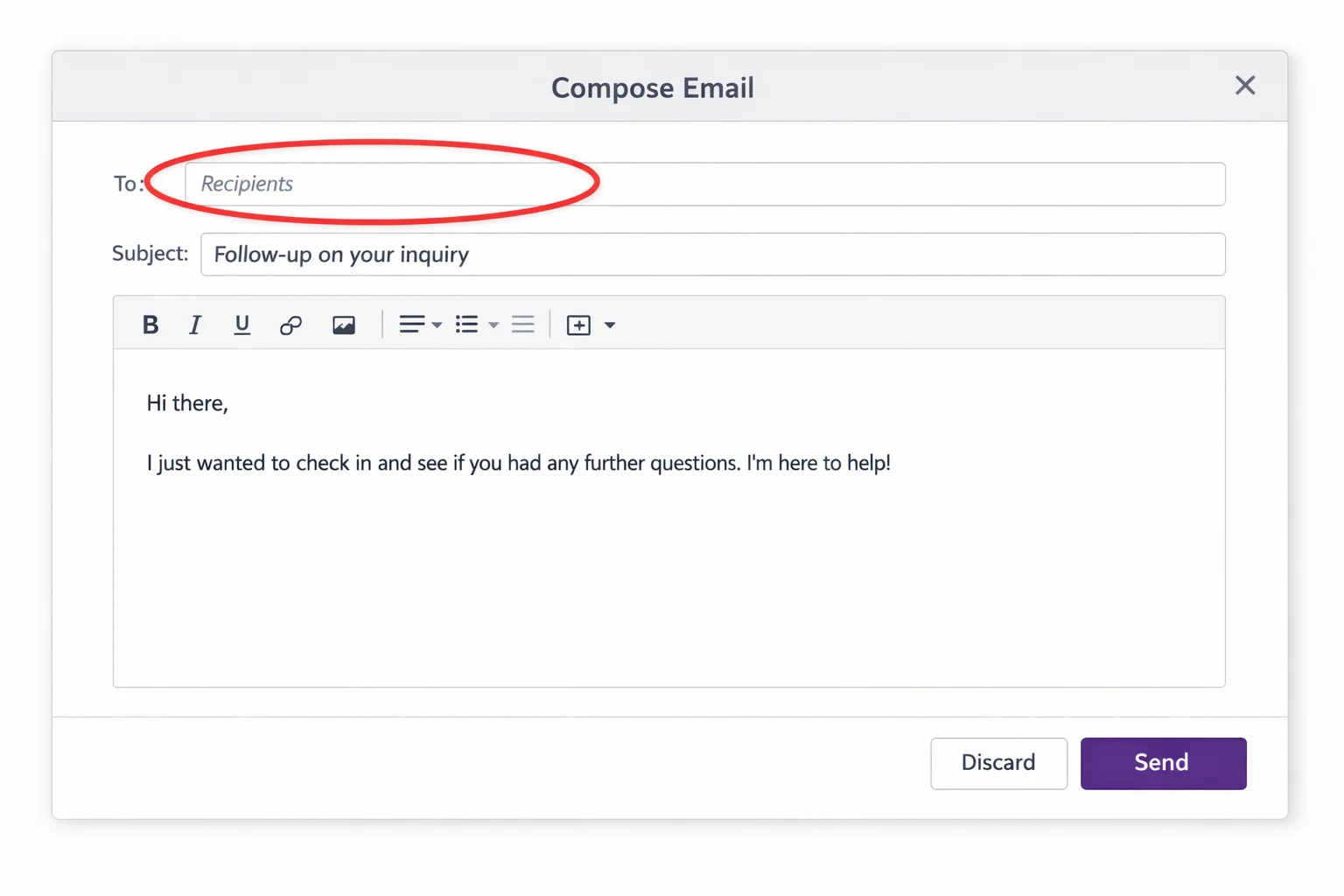
You open a lead. You click Send. The To field is empty.
The contact sits right there on the lead — name, address, all filled in. And still they're not the recipient. The mail composer in Odoo Community knows one thing only: followers. Anyone who isn't one doesn't show up.
So: close the composer, add the contact as a follower, reopen the composer, finally write. It isn't a bug, it's how Odoo Community works by default. It just costs three pointless steps every time — and across twenty leads a day that's half an hour nobody spent selling.
Same lead, same button, different result
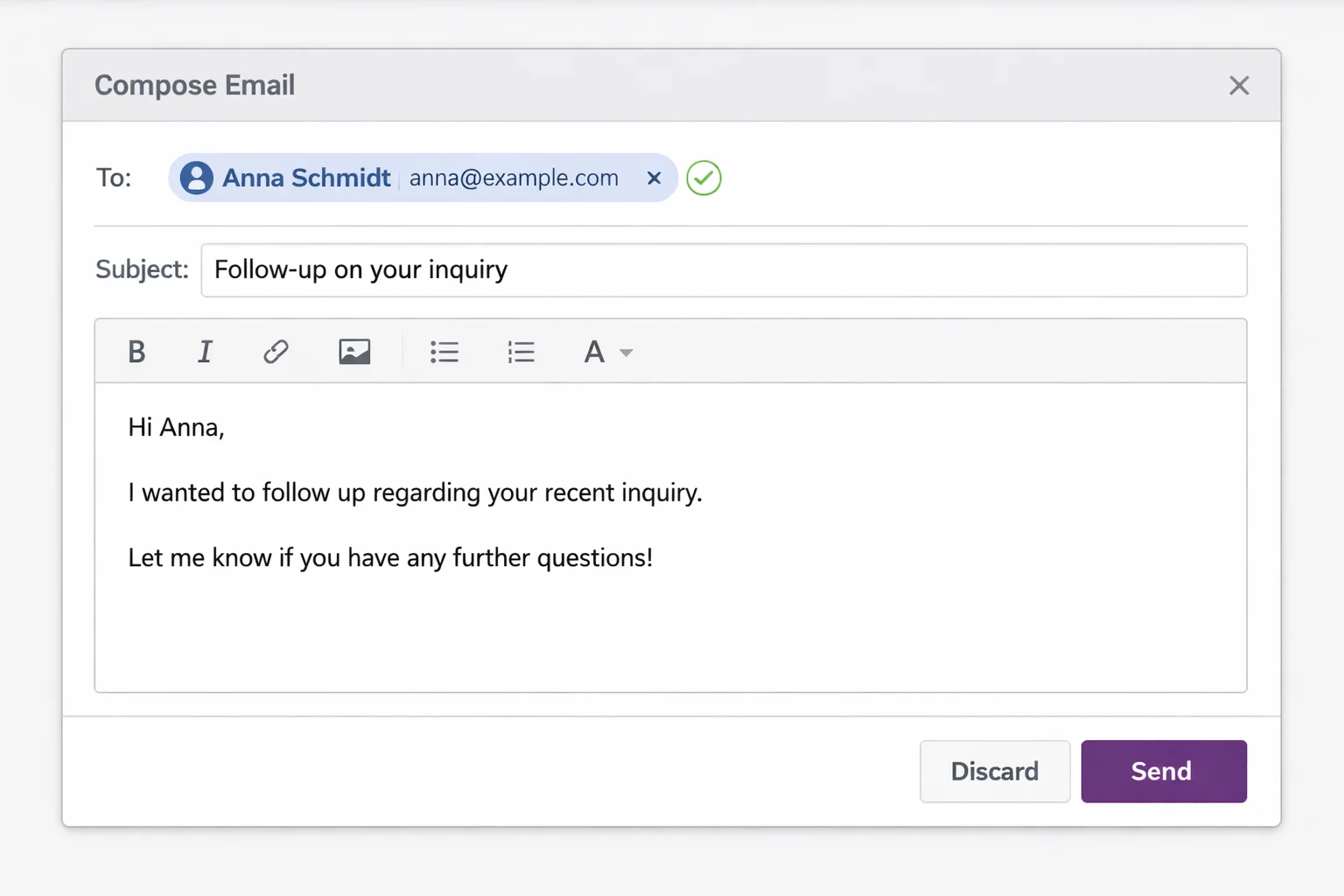
Open lead, click Send, write, send. Nothing else happens — and that's the whole point.
What the module does
It overrides the mail composer for CRM leads. On open it resolves the contact linked to the lead and fills them in as the recipient, follower or not. For every other model — quotations, invoices, projects — the composer stays exactly as Odoo ships it.
What the module does not bring:
- no settings page and no menu
- no new model, no database changes
- no visible change to the interface
It's one Python file doing exactly one thing. You only notice it because a step is gone.
Why it's free
We moved our CRM to Odoo Community and hit this on the very first lead. A day later the fix was running. We've used it every day since.
This isn't a feature anyone should charge for — it's a basic workflow every Odoo Community install with CRM needs. So it sits in the Odoo App Store under LGPL-3, free, no sign-up.
Requirements
- Odoo 19 Community or Enterprise
- The
crmandmailmodules - Self-hosted or Odoo.sh — Odoo Online (SaaS) does not allow custom addons
As with any module: install on a staging database first, verify, then move to production.
When one email isn't enough
CRM Direct Email fixes the foundation: one email to one contact. If you need multi-step sequences, multiple senders and reply detection, that's Cold Email & Follow-up Automation — it builds directly on this module and installs it as a dependency.
Frequently asked.
Do I have to configure anything after installing?
No. The module ships no settings page, no menu and no new model. After installing, the contact is simply there the next time you open the composer from a lead.
Does anything change outside of CRM?
No. The override applies to CRM leads only. On every other model — quotations, invoices, projects — the mail composer behaves exactly as Odoo ships it.
Does it run on Odoo Online (SaaS)?
No. Like any module with custom code it needs an environment that allows custom addons: Odoo Community or Enterprise self-hosted or on Odoo.sh.
Why is it free?
Because it closes a gap in the standard that hits everyone using Odoo Community for CRM. We ran into it ourselves, spent a day on it, and put the fix out under LGPL-3.
Tech stack
- Python
- Odoo
- LGPL-3
Platforms
- Odoo 19
Tags
- Odoo
- CRM
- Open Source