Cold Email & Follow-up Automation
Cold email sequences without Lemlist.
Odoo CRM has no outbound workflow: no sequences, no automation, no tracking. Reps forget follow-ups, leads go cold, deals slip. This module builds the missing part straight into the CRM. You compose campaigns from multiple templates, each step with its own delay; the module schedules the follow-ups and creates a native Odoo activity for each one, so it shows up in the responsible rep's activity feed. Every rep sends from their own address — own display name, own signature, own SMTP server. The recipient sees a person rather than an info@ mailbox, and replies go back to whoever wrote. Replies are detected automatically: the sequence stops, the status flips to Replied, the conversation stays in the CRM thread. 30+ placeholders pull contact, company, sender and Apollo enrichment data into the template, and a placeholder check shows you before sending whether any field would come out blank. Assigning 200 leads to a campaign happens from the list view; start from the contact list instead and the module creates the leads for you, skipping whoever is already in that campaign. Multiple campaigns per lead run independently, each with its own status, step and due date. Do Not Contact works on three levels — lead, contact or company — and cascades from a company to all of its contacts, with reason and timestamp in the audit trail. If you'd rather not click at all, queue the emails: a cron job sends one per minute and flags failures with the error for a retry. This replaces Lemlist, Apollo Sequences or Outreach.io — no second tool, no sync, no addresses leaving your Odoo. Free under LGPL-3. Requirements: Odoo 19 with crm, mail and a configured outgoing mail server; CRM Direct Email is installed as a dependency.
Deals don't die on the pitch, they die on the third follow-up
Everyone writes the first email. The second one too. The third, eleven days later, to a lead whose name you've since forgotten — nobody writes that one. And that's where the deal is.
Odoo CRM won't help you there. No sequences, no delays, no reply detection, no per-lead tracking. Anyone running outbound from Odoo either keeps a spreadsheet on the side or pays for Lemlist, Apollo Sequences or Outreach.io — and then has their sales data sitting in two systems that don't know about each other.
This module builds the missing part where the leads already are.
A campaign is a chain of templates
You define the steps — first touch, follow-up 1, last attempt — and give each one its delay. Sender, language and the weekend rule belong to the campaign, not to the individual email.
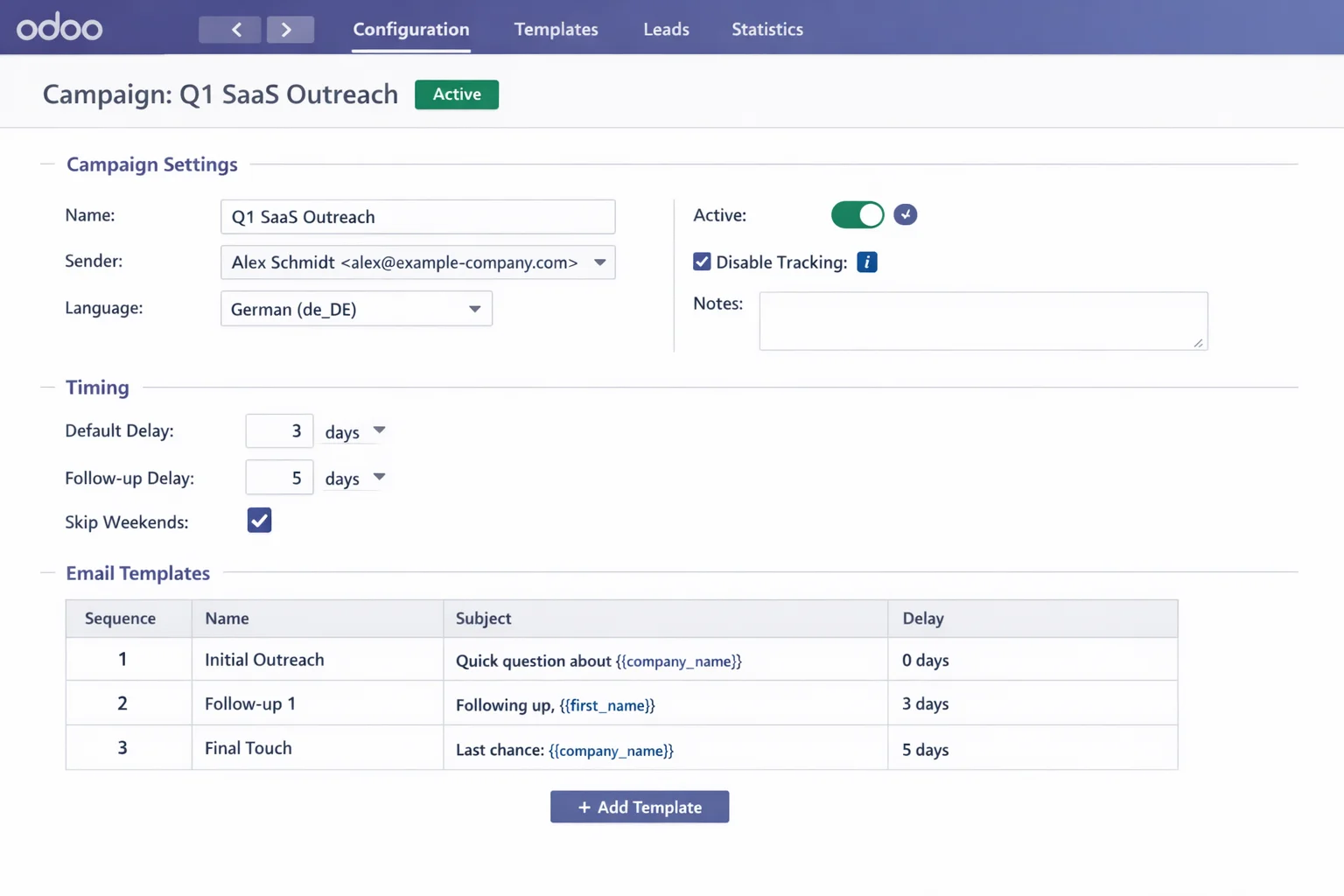
Once an email goes out, the module schedules the next one and creates a native Odoo activity for it. The rep sees it in the activity feed they already use, not in an extra menu they stop opening after two weeks.
Multiple campaigns per lead run independently. "Q1 SaaS Outreach" and "Product Launch" on the same contact at once: separate status, separate step, separate due date.
Every rep sends as themselves
A sender is its own record: display name, address, reply-to, signature and a dedicated SMTP server. Permissions control who may use which; a wizard imports your existing Odoo mail servers.
The recipient sees a person rather than an info@ mailbox — and replies to whoever wrote.
A reply stops the sequence
When someone answers, the module notices by itself: the sequence for that lead halts, the status flips to Replied, the conversation stays in the CRM thread. So no "just circling back" email goes to someone who replied yesterday. From there the rep sets Positive, Not Now or Dead with one button.
200 leads in one go
Select, action, done — assignment happens straight from the list view.
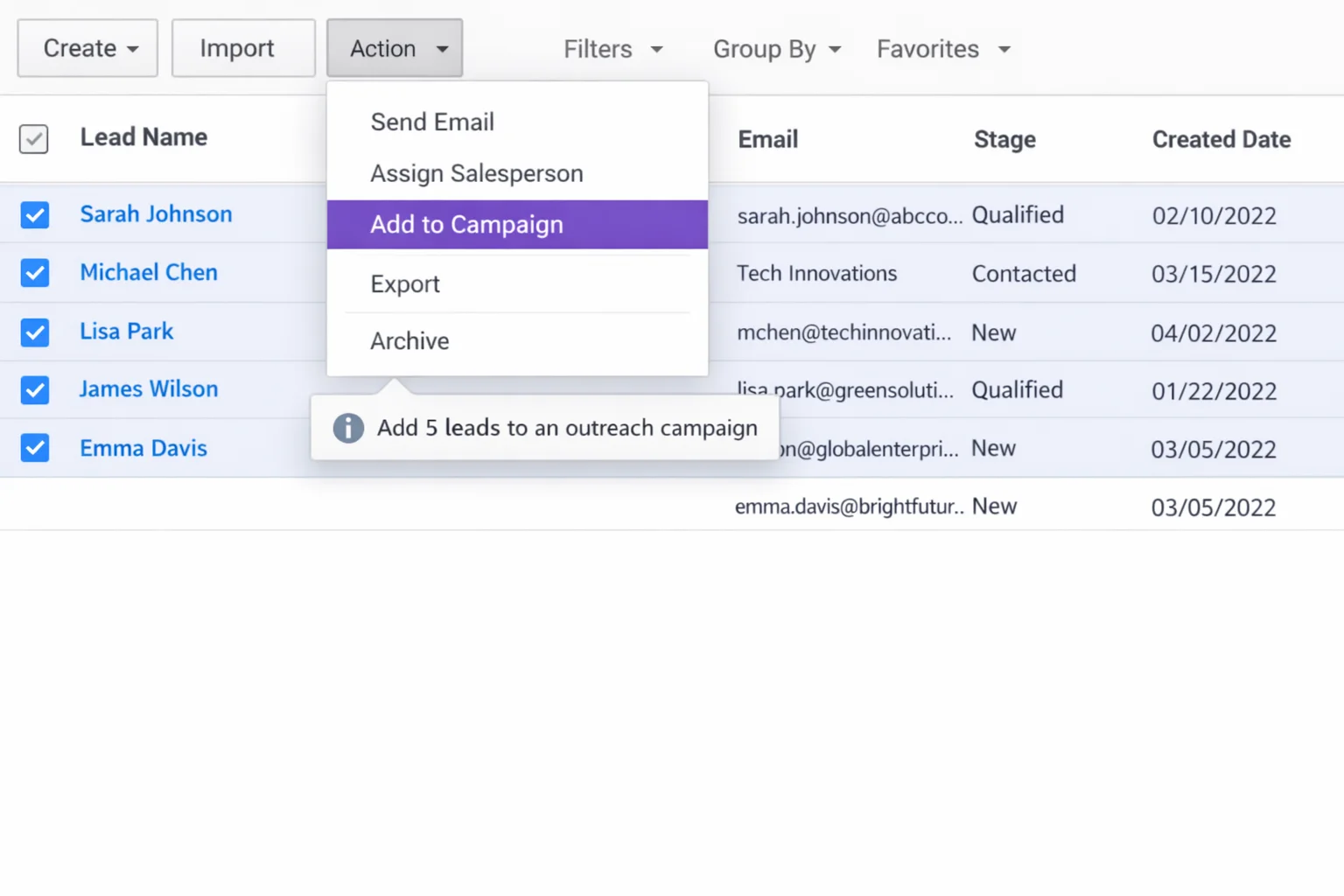
Start from the contact list instead and the module creates the matching leads for you — skipping anyone already in that campaign. Double outreach never happens in the first place.
Placeholders that get checked first
30+ placeholders pull contact, company, sender and Apollo enrichment data into the template: {{ first_name }}, {{ company_name }}, {{ job_title }}, {{ industry }}, {{ seniority }}, {{ signature }}, {{ today }}. Dates are formatted in the campaign's language, HTML is escaped automatically.
The real risk isn't the placeholders though — it's the empty ones. So a wizard checks every field before sending and shows the email exactly as it would arrive.
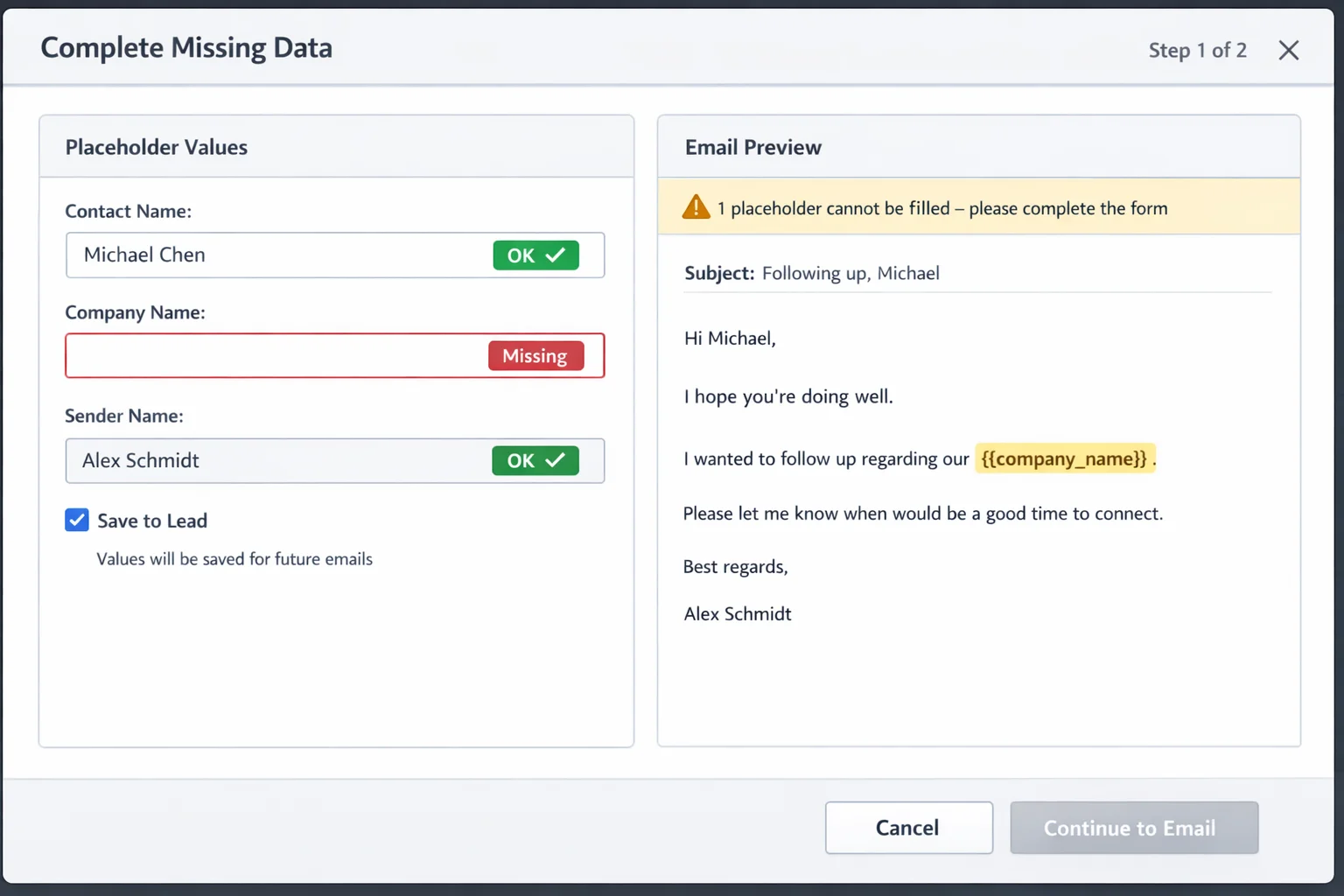
Whatever you fill in here can be saved back to the lead — next time it isn't missing.
Do Not Contact on three levels
You can block a single lead, a contact, or an entire company. The company block cascades: it applies instantly to every contact at that company, across all campaigns, with nobody cleaning up afterwards. Reason and timestamp go into the audit trail.
The send button is then disabled, not merely hidden.
If you'd rather not click, queue it
Emails go into a queue and a cron job sends one per minute. If one fails it stays put with its error message — you fix the cause and retry, instead of guessing what got through.
What it can't do
Deliverability. The module deliberately sends slowly and can disable open and click tracking per email via headers when you send through Brevo and friends. But SPF, DKIM, domain reputation and the recipient's spam filter remain your side of the job — no Odoo module can take that off you, and anyone promising otherwise is selling you something.
Nor does it replace a legal review of your outreach. The Do Not Contact mechanics give you the tooling to work GDPR-compliant — whether your copy and your reason are, is your call.
Requirements and price
- Odoo 19 Community or Enterprise
- The
crmandmailmodules, plus a configured outgoing mail server - CRM Direct Email is installed as a dependency
- Self-hosted or Odoo.sh — Odoo Online (SaaS) does not allow custom addons
Free under LGPL-3. No per-seat price, no volume cap, no subscription — the data lives in your database, sending goes through your mail server.
Screenshots
Frequently asked.
What happens when someone replies?
The reply is detected, the sequence for that lead stops, and the status switches to Replied. No follow-up goes out after someone has answered. The whole conversation stays in the CRM thread.
Can several reps send from their own address?
Yes. Each sender is its own record with display name, address, reply-to, signature and a dedicated SMTP server; permissions control who may use which. Existing Odoo mail servers can be imported with a wizard.
How do I stop blocked contacts from being emailed?
With Do Not Contact at lead, contact or company level. Blocking a company applies instantly to all of its contacts across every campaign — reason and timestamp included in the audit trail. The send button is then disabled, not merely hidden.
Do the addresses leave my Odoo?
No. Campaigns, templates, statuses and history live as Odoo models in your own database, and sending goes through your own SMTP server. There is no external service anything gets handed to.
Does the module handle deliverability?
Partly, and we'd rather say so plainly: the queue deliberately sends one mail per minute instead of a hundred at once, and open/click tracking can be disabled per mail via headers when you send through Brevo and friends. SPF, DKIM, domain reputation and the recipient's spam filter remain your side of the job.
Tech stack
- Python
- Odoo
- LGPL-3
Platforms
- Odoo 19
Tags
- Odoo
- CRM
- Cold Email
- Sales Automation
- Open Source