The contract arrives as a PDF attachment. Signing takes two seconds. Getting there takes half an hour: print it, sign it, walk to the scanner, find the file, attach it, send it. And if you have no printer, you photograph the sheet at an angle on the kitchen table and send back a gray, warped image.
The question underneath is always the same. Does that even count? Can you just put your signature on a PDF, or does it have to be paper?
The short answer: for almost every document you meet in daily life, a signature on the PDF is enough. For a small, nameable group it is not, and in those cases printing it out does not help either. This piece separates the two groups, then shows how to get it done on an iPhone in under a minute.
Disclosure: I build SignaScan, one of the apps that appears below. That is also why I spell out when Apple's built-in tools are all you need. A bad recommendation earns me nothing but support mail.
Not legal advice: I am a developer, not a lawyer. Everything here is gathered to the best of my knowledge, as of when I built the app, and it does not replace legal advice on your specific case. Laws change, and your situation may have particulars that do not appear here. If money or your job depends on a document, ask someone with a license.
Three levels, and you almost always mean the first
The EU regulates electronic signatures in the eIDAS Regulation. It knows three levels, and the difference between them is not validity but evidential weight.
| Level | What it is | What you need | Typical use |
|---|---|---|---|
| Simple (SES) | Your signature as an image in the document, your typed name under an email | Nothing. A device is enough | Quotes, forms, consent slips, everyday paperwork |
| Advanced (AES) | Uniquely linked to you, later changes to the document become detectable | A certificate and signing software | Contracts where a dispute is plausible |
| Qualified (QES) | An AES plus verified identity through a certified provider | Identity check and a qualified certificate, usually paid | Wherever the law demands written form |
The sentence that matters is in Article 25 of eIDAS: an electronic signature shall not be denied legal effect solely on the grounds that it is in electronic form. A simple signature is therefore not "less valid". It is admissible as evidence like any other document. The difference is how easily you can prove, in a dispute, that the signature really is yours and that nobody touched the document afterwards.
Outside the EU the framing changes but the conclusion holds. In the United States the ESIGN Act and UETA give electronic signatures the same effect as ink for most contracts, with a similar short list of exceptions such as wills. In the UK, electronic signatures are valid under the Electronic Communications Act 2000 and the retained eIDAS rules. Everywhere, the interesting question is the same one.
The point most guides skip
Contracts are, as a rule, form-free. A bike sale is a valid contract if the two of you agree over text message. In cases like that the signature is not what makes the contract valid, it is evidence: it records who promised what and when.
So the right question is never "is a digital signature valid". It is: does the law prescribe a form for this specific document? In the overwhelming majority of cases it does not.
Where a signature on the PDF is enough
- →Quotes, order confirmations, framework agreements
- →Service and freelance contracts with no special form requirement
- →Non-disclosure agreements
- →Consent slips for school, nursery and clubs
- →Internal forms: leave requests, expense claims, registrations
- →Trade and repair orders, cost estimates
- →Delivery notes, handover and acceptance protocols
- →Powers of attorney, unless written form is explicitly required
That covers most of what ever lands in your inbox.
Where it is not enough
These are the German examples, and most European jurisdictions have an equivalent short list. Here the law demands a handwritten signature on paper, or rules out the electronic form outright:
- →Terminating an employment contract, and termination agreements. Section 623 of the German Civil Code demands written form and explicitly excludes the electronic form. An emailed resignation is void no matter how it is signed.
- →A private person's guarantee, section 766.
- →Wills. Must be written and signed entirely by hand, section 2247. Typed and signed does not work even on paper.
- →Consumer loan agreements, section 492. Written form is required, and a signature placed into a PDF does not meet it; only a qualified electronic signature can replace it.
- →Anything requiring notarization, such as buying real estate, section 311b.
There is a second group where form does not decide validity but triggers a legal consequence. The best known case is a residential lease running longer than a year: without written form the lease is not void, but it counts as open ended and can be terminated on the ordinary notice period, section 550. Whether that helps or hurts you depends on which side of it you sit.
And then there is the most common obstacle in practice, which is not statutory at all: the other side insists. Public authorities, insurers and banks have their own rules. If their form says "qualified electronic signature", no argument about form freedom will help.
One note on the date of this article: form requirements keep getting relaxed, and German bureaucracy reduction acts have moved several of them from written form to text form in recent years. If a document really matters, check the current state or ask whoever is demanding it.
Printing and scanning changes nothing legally
This is the part that surprises most people. A sheet you printed, signed and scanned back in is legally the same thing as a signature you drop straight into the PDF: a simple electronic signature. The ink original sits in your paper pile, what you sent was an image file.
The detour through the printer does not improve your evidential position. It costs half an hour and a sheet of paper. If written form really is required, only the signed original by post or a qualified signature will do.
How to sign on an iPhone
Route 1: built in, free
iOS can do this without any extra app:
- 01Open the PDF in Mail or the Files app.
- 02Tap the markup icon, the pen in a circle.
- 03Tap the plus at the bottom right, then "Signature".
- 04Draw with your finger or an Apple Pencil, or pick a saved signature.
- 05Place it, size it, tap Done, share.
For a school consent slip this is the right answer, and I recommend it without hedging. It gets awkward with multi page documents that need initials on every page, with forms that also want a date, tick boxes and text fields, and at the moment you want to find the finished file again.
Route 2: an app that does only this
SignaScan came out of exactly that friction. Your signature lives in the app, the PDF goes in, the signature lands where it belongs, the file goes back out. No printer, no scanner, no trip to an office.
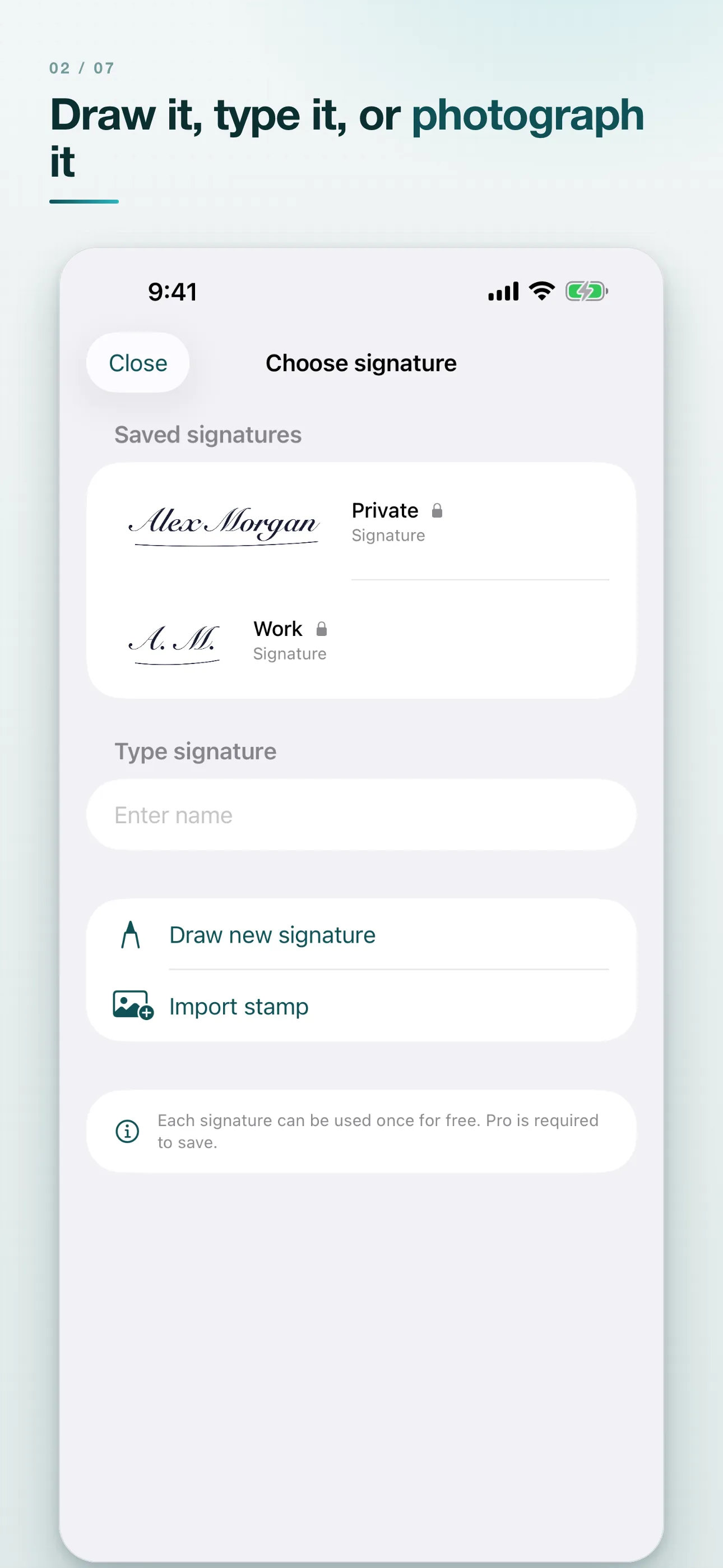
There are three ways to make a signature. Draw it with a finger or Apple Pencil, on a canvas that sits along the long edge of the phone: a signature is wide and flat, and in portrait you end up writing it into a tower and never hit your own handwriting. Type your name and pick one of four handwriting styles, for forms where the stroke of your own hand does not matter. Or photograph a signature you already have on paper and reuse it as a stamp.
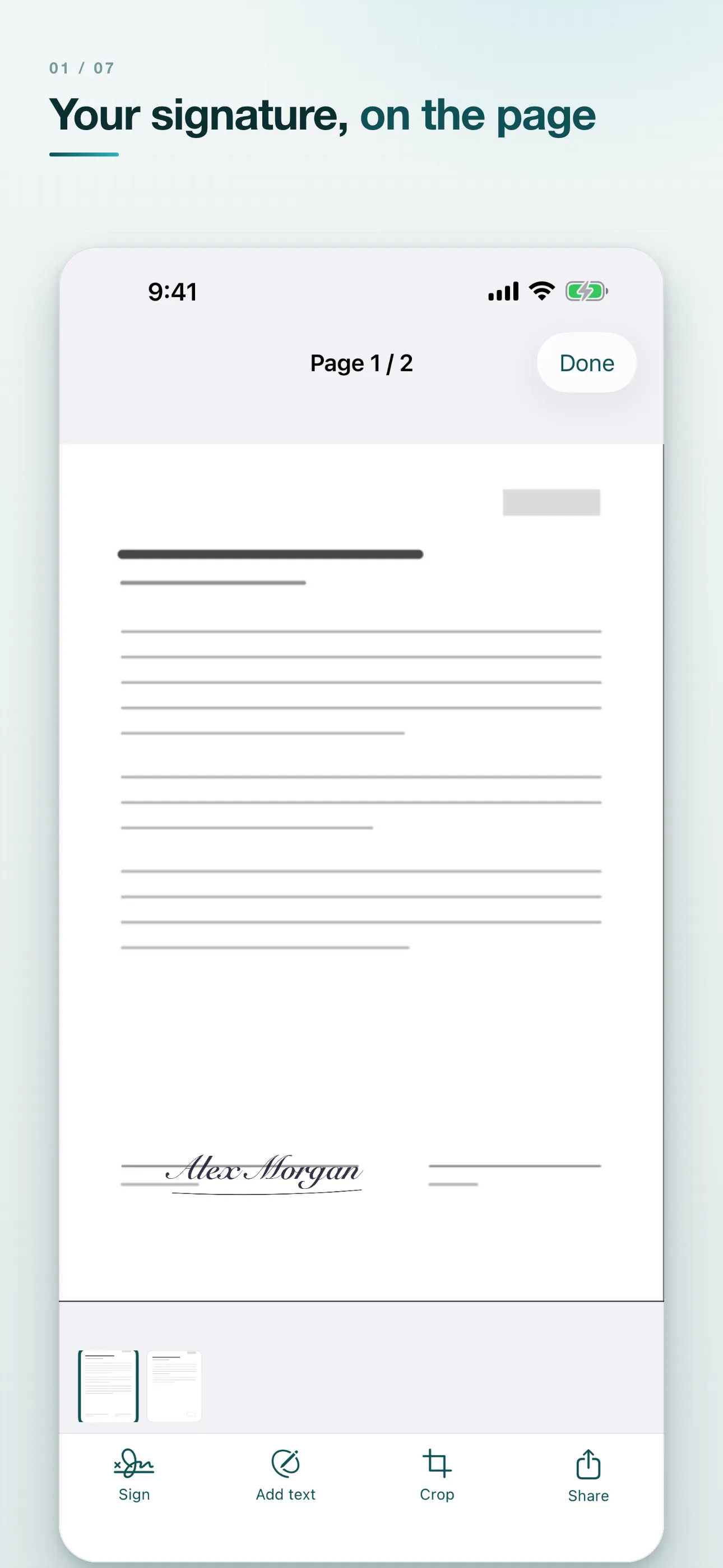
Placement is free: drag, scale, several signatures per page, on one page or on all of them. The signature sits as its own layer above the document, so you can move it or take it off again without damaging the page.
On the free version you can use each signature you create once, and the free version puts a small "Created with SignaScan" note in the document. Pro stores signatures permanently, one personal, one for work, one as initials, removes the note, and adds text fields, tick boxes and the date so a form can be finished in one pass. Pro is a one-time purchase, currently €1.99. No subscription, no account, Family Sharing included.
Route 3: a qualified signature
If written form is required and the other side accepts electronic documents, you need a certified trust service provider. You identify yourself once, by video, with your ID card over its eID function, or in person, receive a qualified certificate and sign with it. Who is allowed to issue those in the EU is listed in the EU Trusted List. It costs money and takes time the first time round, but it is the only route that replaces a handwritten signature.
SignaScan explicitly does not do this. It produces a simple electronic signature, the same thing you get by printing and scanning. It also has no recipient workflow with signature requests and an audit trail: it signs your document, it does not manage a counterparty. If you need a QES or an audit trail, you are better off elsewhere, and the product page says so too.
The real problem is not the signature, it is the date inside the document
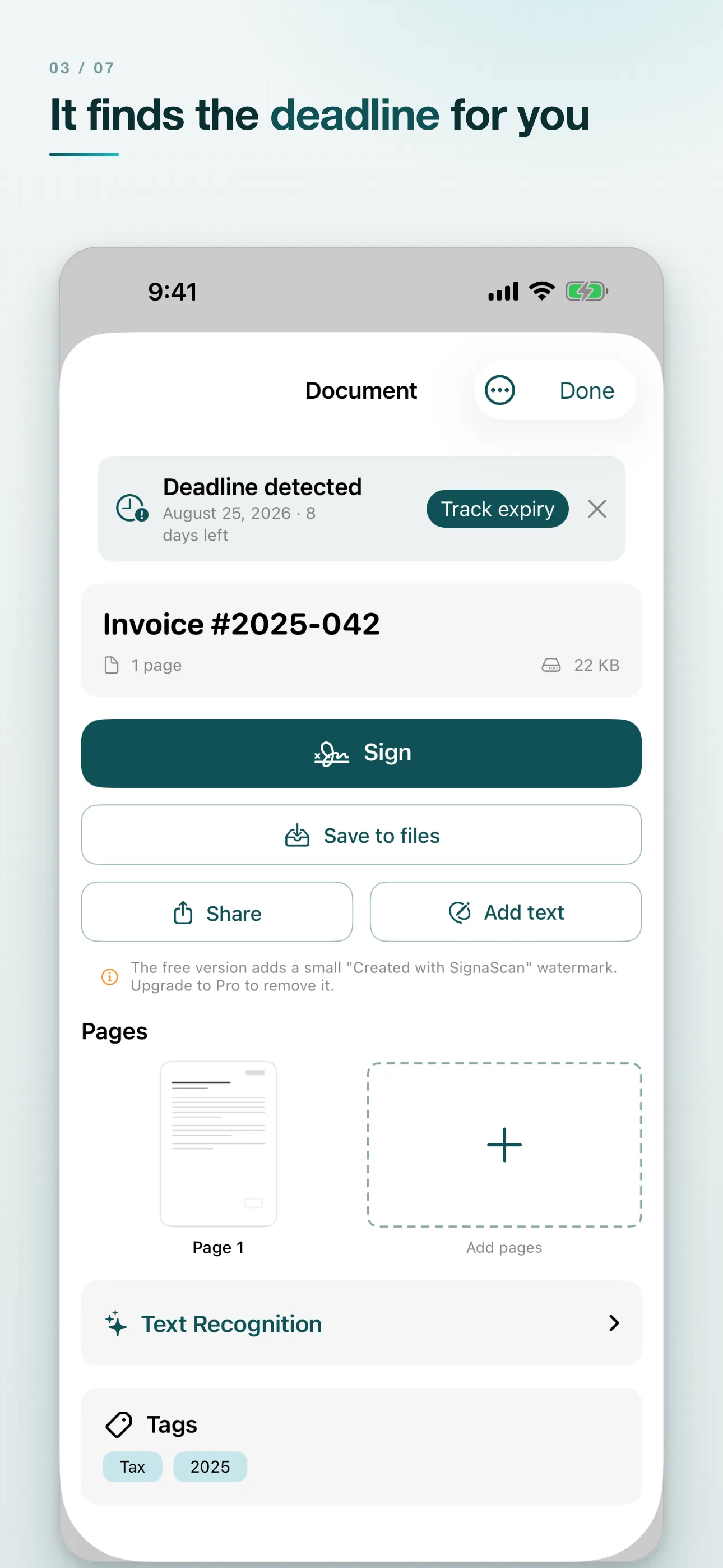
"Payable by August 25" sits on line 14. You read it, you nod, and two weeks later the reminder arrives. Signing was never the hard part of a contract. The date inside it was.
SignaScan reads those dates out of the document, payment terms, notice periods, the expiry date on an ID card, and turns them into a tracked deadline with one tap. Reminders arrive 30 days, 7 days and one day before. The overview leads with the next deadline and its countdown, then separates overdue, upcoming and scheduled. With Pro the deadline also goes into a dedicated calendar named "SignaScan" rather than into the middle of your work calendar: one switch in the Calendar app and they are hidden. Delete the deadline in SignaScan and the event goes with it.
That is why the app gets opened again after the first contract. If your deadlines live in an Excel sheet rather than in letters, CellAlert solves the same problem there.
The routes compared
| Route | Signature level | Cost | Strengths | Limits |
|---|---|---|---|---|
| Apple Markup | Simple | Free, built in | Always there, nothing to install, fine for a single sheet | No text fields or tick boxes, no filing, multi-page documents are tedious |
| SignaScan | Simple | Free, Pro €1.99 once | Saved signatures, text fields, scanner with text recognition, deadline detection, all on-device | iOS only, no recipient workflow, no audit trail, no QES |
| Adobe Acrobat Reader | Simple | Free with an account, features behind a subscription | Widespread, on every platform, good form support | Account required, cloud tied, the useful parts are in the subscription |
| DocuSign, Adobe Acrobat Sign | Simple to qualified | Subscription | Recipient workflow, reminders, audit trail, multi-party contracts | Cost, documents live with the provider, overkill for a consent slip |
| Trust service provider (QES) | Qualified | Per signature or subscription, identity check required | Replaces a handwritten signature where the law demands one | Setup takes time, costs money, unnecessary for everyday documents |
Honestly summarized: a single sheet gets signed with Apple Markup. If contracts, invoices and forms pass through your hands regularly, a dedicated app saves you a few minutes every time. If you need to collect signatures from other people and prove they are genuine, you need DocuSign or a QES provider, and neither of the first two rows.
What stays on the device
A signed document deserves the same treatment as an ID card: it is nobody else's business. SignaScan has no registration, no login, no password. Text recognition, analysis and deadline detection all run on the device, so the app works in airplane mode exactly as it does on wifi. Stored documents are encrypted and can be locked behind Face ID or Touch ID. If you need the documents on more than one device, you switch on optional iCloud Drive sync, and that runs through your own Apple ID, not through a server of ours.
That is not a marketing position, it is a question of liability. What never gets uploaded cannot leak from a provider.
What is still hiding inside the document before you sign is a separate question. For Word files, The Second Look catches leftover comments, tracked changes and metadata before the PDF is even made.
Frequently asked questions
Is a digital signature on a PDF legally valid?
As a rule, yes. Contracts are generally form free, and under Article 25 of eIDAS an electronic signature cannot be denied legal effect solely because it is electronic. A handful of documents are excepted, see above.
Is it enough to drop an image of my signature into the PDF?
For anything form free, yes. That is a simple electronic signature and it is admissible as evidence. Where the law demands written form it is not enough, and neither is a scan.
Is printing, signing and scanning safer?
Not legally. In both cases what you sent is an image, which is a simple electronic signature. The printout only costs you time.
When do I need a qualified electronic signature?
When the law demands written form for the document and does not rule out the electronic form, or when the other side explicitly requires it. Then the route runs through a certified trust service provider with an identity check.
Can I sign a resignation letter digitally?
Under German law, no. Section 623 of the Civil Code demands written form and explicitly excludes the electronic form. The termination has to be signed by hand and delivered as an original.
How do I sign a PDF on an iPhone without an extra app?
Open the PDF in Mail or Files, tap markup, tap the plus at the bottom right, choose "Signature", draw, place, done. It is built into iOS and costs nothing.
How do I create a digital signature?
Three ways: draw it with a finger or Apple Pencil, type your name and pick a handwriting style, or photograph a signature you already have on paper and import it as a stamp. All three produce a simple electronic signature.
Can I sign a PDF without uploading it anywhere?
Yes. Apple Markup and SignaScan both work on the device. In SignaScan, text recognition and deadline detection are local too, so the app works in airplane mode.
What does SignaScan cost?
The app is free, each signature you create may be used once, and the free version puts a small note in the document. Pro is a one-time purchase, currently €1.99, with no subscription and no account, and Family Sharing is included.
Can I store more than one signature?
With Pro, yes, for example one personal, one for work and a set of initials for page margins. Without Pro you create one each time.
Does this work with paper documents too?
Yes. The built in scanner detects edges, corrects perspective and takes multi page documents with no page limit. After that it is a PDF like any other.
Does the app detect deadlines automatically?
It reads dates out of the document, payment terms, notice periods or expiry dates, and offers to turn one into a tracked deadline. You confirm it, and reminders arrive 30 days, 7 days and one day before.
In short
Everything above is researched to the best of my knowledge and is still not legal advice. In case of doubt your specific situation decides, and only someone who looks at it can tell you how.
For almost everything in daily life, the answer to "can I sign this digitally" is yes. The exceptions are short and nameable, and where they apply the printer will not save you either. Everything else is just a question of how many minutes you lose on the way.
